
Does WP Ghost Have 7G Firewall Protection?
This tutorial has moved to the new WP Ghost Knowledge Base where each feature is presented in detail.
Yes. WP Ghost includes both the 7G Firewall and the newer 8G Firewall, both created by security expert Jeff Starr. These server-level rulesets block SQL injection, script injection, bad bots, and automated attacks before they reach WordPress. The 8G Firewall is now the recommended default, but 7G remains available as a reliable fallback. Both are free features included in every WP Ghost installation.
What Is the 7G Firewall and What Does It Block?
The 7G Firewall is a set of server-level security rules created by Jeff Starr of Perishable Press. It’s part of the G-series firewall rulesets (5G, 6G, 7G, 8G) that have protected millions of websites worldwide. WP Ghost integrates the 7G ruleset natively, so you don’t need to manually edit any configuration files.
The 7G ruleset blocks SQL injection attempts, script injection and XSS attacks, directory traversal, file inclusion exploits, bad bots and automated scanners, spam submissions, and malicious query strings. It does this at the server level, meaning blocked requests never reach WordPress core, your plugins, or your database. They consume minimal server resources to reject.
Should I Use 7G or the Newer 8G Firewall?
Start with 8G. It’s the latest generation and the recommended setting. The 8G Firewall includes all 7G protections plus updated patterns for modern attack techniques and fewer false positives. Switch to 7G only if 8G causes a specific compatibility issue with a plugin or server configuration. Think of 7G as the reliable fallback: proven, stable, and thoroughly tested, but without the latest pattern updates that 8G includes.
WP Ghost offers four firewall levels in total: Minimal (basic filtering, most compatible), Medium (extended pattern matching), 7G Firewall (comprehensive server-level filtering), and 8G Firewall (most advanced, recommended). If the 7G or 8G level causes issues with legitimate functionality, step down to Medium or Minimal first.
How Do I Activate the 7G Firewall in WP Ghost?
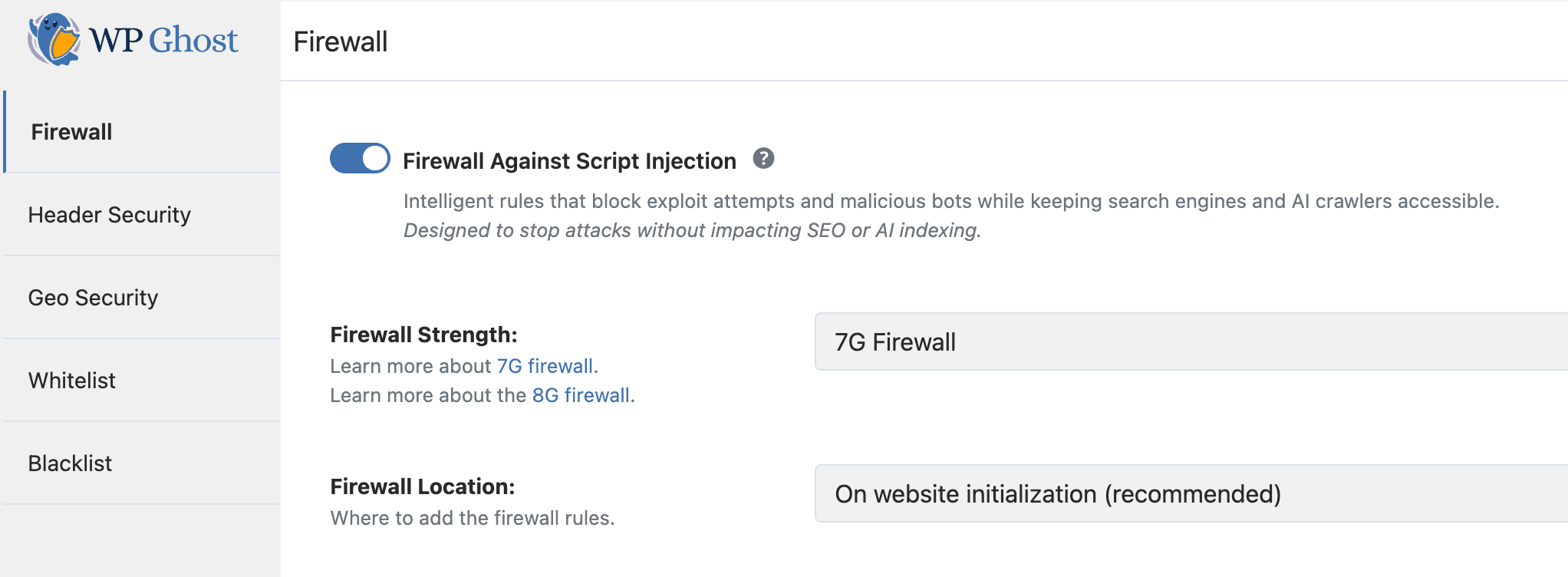
Go to WP Ghost > Firewall. Switch on Firewall Against Script Injection. Select 7G Firewall from the firewall strength list. On Apache servers, you can choose to place the rules in .htaccess (fastest, blocks at web server level) or load them during WordPress initialization (broader compatibility). On Nginx and LiteSpeed, the firewall loads during initialization automatically. Click Save.
After activating, test your site: browse key pages, submit contact forms, test checkout if you’re using WooCommerce, and verify admin functions work correctly. If anything breaks, switch to a lower firewall level and test again.
For the complete firewall configuration guide including automated IP blocking, header security, and theme detector blocking, see the firewall security tutorial. For the detailed 7G tutorial, see the 7G Firewall for WordPress guide.
Does the 7G Firewall Work on All Server Types?
Yes, but the method varies by server. On Apache servers, the 7G rules are placed in .htaccess where they execute at the web server level before PHP even loads. This is the fastest method. On Nginx and LiteSpeed servers, the rules load during WordPress initialization. Either way, malicious requests are blocked before they can reach your vulnerable plugins, themes, or database.
The original article noted that 7G was only for “Apache-based servers.” That’s no longer the case. WP Ghost now supports the firewall on all server types.
Frequently Asked Questions
Does the 7G Firewall affect page loading speed?
It actually improves performance for sites under attack. Malicious requests are rejected at the server level with minimal resources. For legitimate traffic, the overhead is negligible. When placed in .htaccess, the rules execute before PHP starts, so blocked requests cost almost nothing to process.
Can I use the 7G Firewall alongside Wordfence or Solid Security?
Yes. The 7G Firewall operates at the server/configuration level. Wordfence and Solid Security operate at the PHP/application level. They protect at different layers and complement each other without conflict.
Does the firewall affect SEO or search engine crawlers?
No. WP Ghost automatically whitelists major search engine crawlers (Googlebot, Bingbot, Yandex) when the 7G or 8G Firewall is active. Legitimate crawlers access and index your site normally. Your content, sitemaps, and rankings are unaffected.
Is the 7G Firewall a free feature?
Yes. Both the 7G and 8G Firewalls are included in WP Ghost Free along with 115+ other security features. No premium upgrade is required for firewall protection.
Does WP Ghost modify WordPress core files?
No. The 7G Firewall rules are placed in .htaccess (Apache) or loaded through WordPress hooks (Nginx/LiteSpeed). No core files are modified. Disabling the firewall removes all rules instantly.