
What Is WP Ghost Backup and Restore? How Does It Work?
This tutorial has moved to the new WP Ghost Knowledge Base where each feature is presented in detail.
Backup and Restore lets you export all WP Ghost settings to a file and import them on the same site or a different site. You can save your entire security configuration, replicate it across multiple client sites, or restore a previous setup after testing changes. The backup file contains only WP Ghost configuration data, not WordPress content or database tables. This is a free feature.
How It Works
Go to WP Ghost > Backup/Restore. Click Backup to download a file containing all your current WP Ghost settings: path configurations, firewall rules, brute force settings, 2FA configuration, security headers, text mapping rules, and every other option in the plugin. The file saves to your computer as a JSON export.
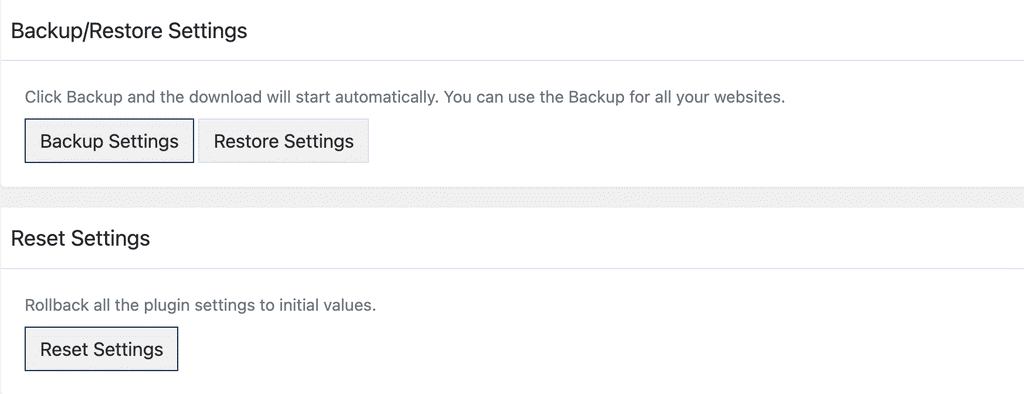
To restore, go to the same page, click Restore, select the backup file, and confirm. WP Ghost overwrites all current settings with the ones from the backup file and applies them immediately. Clear your cache after restoring to make sure the new paths are reflected across your site.
Common Use Cases
Replicate settings across multiple sites. This is the most popular use case, especially for agencies and freelancers. Configure WP Ghost on one site, fine-tune all the paths, firewall rules, brute force settings, and security headers until everything is perfect. Create a backup. Then import that backup on every other site you manage. Instead of configuring each site from scratch, you apply a proven setup in seconds. This works across hosting providers and server types, although you should run a Security Check after restoring on a new server to confirm everything works correctly.
Save a known-good configuration before testing changes. Before experimenting with new path configurations, firewall rules, or security settings, create a backup of your current working setup. If the changes cause issues, restore the backup and you are back to your proven configuration instantly.
Migrate settings during site moves. When migrating a WordPress site to a new host or domain, you can export your WP Ghost settings, complete the migration, then import the backup on the new server. The paths and security rules are restored without manual reconfiguration. Verify server compatibility after restoring since different server types (Apache vs Nginx) may need different configurations.
What the Backup Includes (and What It Doesn’t)
The backup file contains only WP Ghost’s own configuration data stored in the WordPress options table. This includes all path settings, firewall configuration, brute force rules, 2FA settings, text and URL mapping rules, security header values, and every toggle and field in the plugin. It does not include WordPress content, database tables, media files, theme or plugin files, or any data outside of WP Ghost’s settings. It is not a replacement for a full WordPress backup.
For the recommended security configuration to use as your backup baseline, see the Best Practice guide. For emergency access if a restored configuration causes issues, see the Emergency Disable tutorial.
Frequently Asked Questions
Can I restore a backup from one server type on a different server type?
Yes, but verify the configuration after restoring. Some WP Ghost features like .htaccess-based rules work differently on Nginx. Run a Security Check at WP Ghost > Security Check after restoring to confirm everything works on the target server.
Will restoring a backup overwrite my current login path?
Yes. Restoring replaces all WP Ghost settings, including the custom login path. After restoring, your login path will match whatever was saved in the backup file. Bookmark the new login URL immediately after restoring.
Is Backup and Restore a free feature?
Yes. Backup and Restore is available in the free version of WP Ghost.
Does WP Ghost modify WordPress core files?
No. Backup and Restore reads and writes WP Ghost’s own configuration data stored in the WordPress options table. No core files are modified during backup or restore.