WordPress Hack Prevention: The Complete 2026 Guide
April 16, 2026
Last updated: April 2026
WordPress hack prevention means blocking attacks before they reach your site, not cleaning them up after they succeed. Around 91% of WordPress vulnerabilities come from plugins and themes, and bots exploit newly disclosed flaws within 5 hours of public release. Reactive tools like malware scanners find hacks after damage is done. Prevention tools reduce your attack surface so bots can’t find a door to break in through. This guide covers the 2026 WordPress threat picture, the six attack types behind 90%+ of breaches, and the three-layer prevention framework that stops them. It also shows how WP Ghost’s 115+ free features and how WP Ghost’s 150+ premium features map to each layer, and where prevention reaches its limits.
What Is WordPress Hack Prevention?
WordPress hack prevention is a set of practices and tools that stop attacks before a vulnerability can be exploited. It works by reducing the signals attackers use to identify and target your site, filtering malicious traffic before it reaches WordPress, and hardening the authentication points where breaches happen most.

Prevention is different from malware scanning. A scanner finds malicious code that’s already on your server. Prevention keeps that code from being planted in the first place. You need both, but the order matters. Most WordPress security advice focuses on scanning and cleanup, which treats breaches as inevitable. Prevention treats breaches as avoidable for the 90%+ of attacks that come from opportunistic bots running the same scripts against millions of sites.
The core metaphor: hide the doors and windows, then lock the ones that remain. Bots follow scripts. If a script checks for /wp-login.php and the path doesn’t exist, the script moves on to the next site.
Why Prevention Beats Cleanup in 2026
The economics of cleanup got worse in 2026. Three forces made prevention the only sensible starting point for WordPress security.
AI-powered reconnaissance. Attack scripts now use AI to identify vulnerable WordPress sites in minutes, not weeks. Patchstack’s 2026 whitepaper documents a weighted median of 5 hours from public vulnerability disclosure to mass exploitation. If you’re waiting for your cleanup plugin to detect an infection, the attacker has already had a half-day head start.
Plugin supply chain attacks. Attackers increasingly compromise plugins at the source, which means the malicious code arrives through a legitimate update channel. In early 2026, a popular contact form plugin was compromised for 18 hours before detection, and over 200,000 sites were affected. Scanning can’t catch an infection that came in through a signed update, but prevention (reducing what an attacker can do once they get in) still limits the damage.
Modern malware evades scanning. Families like Parrot TDS use cloaking to serve clean content to security scanners while redirecting real visitors to phishing pages. Your scanner says the site is fine. Your customers say they got redirected to a scam. By the time you find out, Google has already flagged the domain. Prevention avoids the whole category because the malware never gets planted.
The cost math also works in prevention’s favor. The average total recovery cost for a small business hit by a WordPress hack is around $14,500, which covers malware cleanup, emergency developer time, downtime, lost revenue, and the SEO work to undo Google manual penalties and injected spam links. Proactive protection runs a fraction of that per year and stops most of the incidents from happening in the first place.
The 2026 WordPress Threat Picture
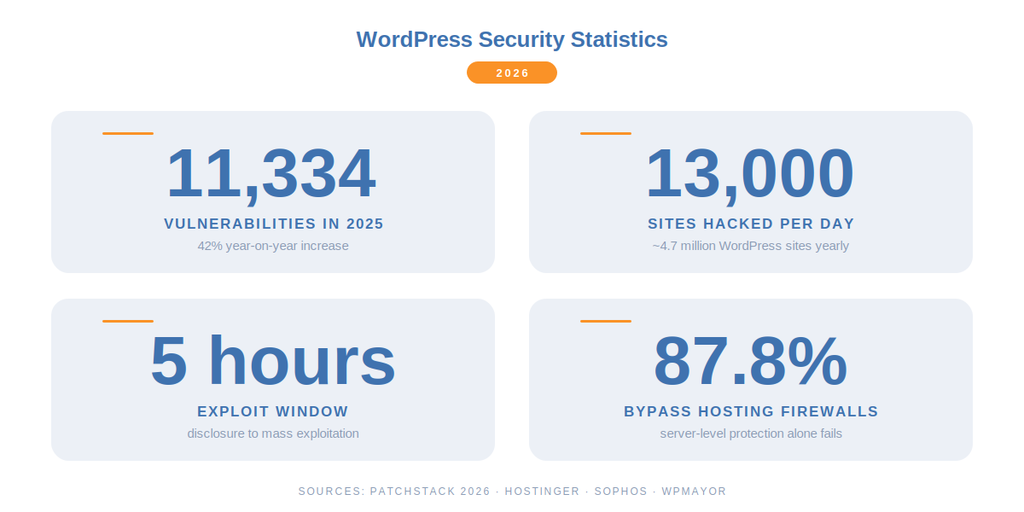
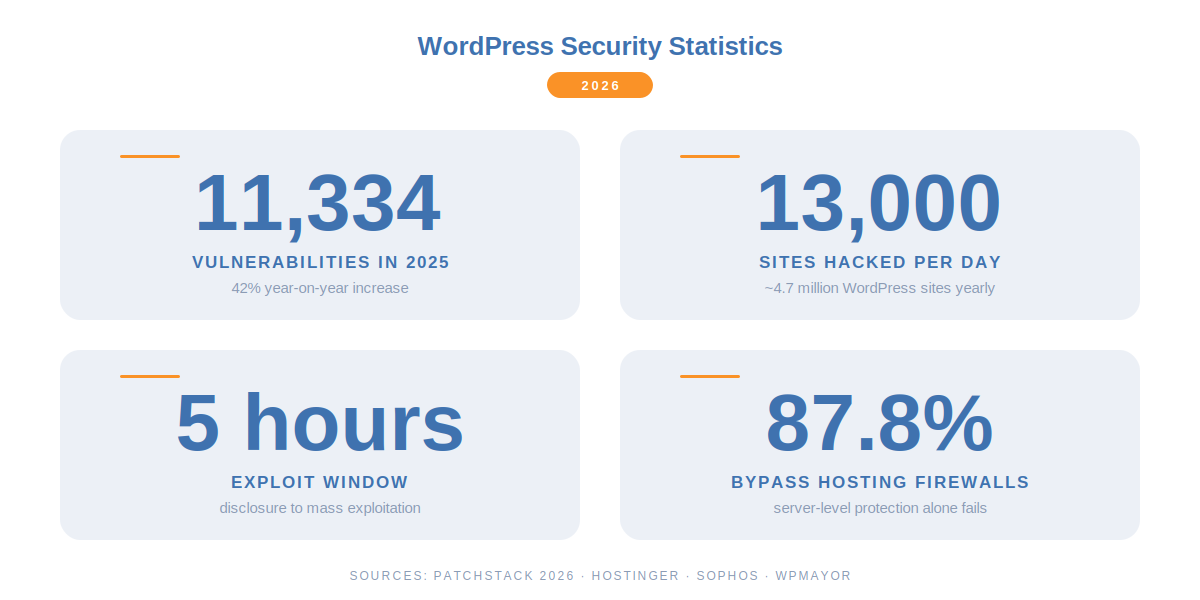
These are the numbers that define WordPress security right now, drawn from our full WordPress Security Statistics 2025-2026 research. Every one of them points to the same conclusion: predictable site structure plus slow patching equals compromise.
- 43.5% of all websites run WordPress (Hostinger, 2026). One scanner hitting the entire internet will find millions of targets.
- 91% of WordPress vulnerabilities live in plugins, not core (Patchstack, 2026). Core is maintained by professionals. The ecosystem around it is not.
- 11,334 disclosed WordPress vulnerabilities in 2025, a 42% year-on-year increase (Patchstack, 2026). A record year by a substantial margin.
- 52% of plugin developers don’t patch before disclosure (Patchstack, 2026). Attackers read the disclosure, you probably didn’t.
- 5 hours, the weighted median from public vulnerability disclosure to mass exploitation (Patchstack, 2026). Faster than most admins check updates.
- Around 13,000 WordPress sites hacked every single day, roughly 4.7 million per year (WPMayor via Sophos).
- 87.8% of WordPress-specific exploits bypass standard hosting firewalls (Patchstack via Xictron, 2026). Server-level protection alone is not enough.
- 57% of vulnerabilities require no authentication at all (Patchstack Mid-Year 2025). Any anonymous visitor, including a bot, can trigger them.
- ~90% of attacks are preventable through basic security hygiene (OsomStudio, 2026). The bots move on when a site looks harder than average.
The last number is the one that matters most. Most attackers are not genius hackers targeting you personally. They’re bots running scripts against every IP on the internet. Make your site look unusual and most of them leave.
How WordPress Sites Actually Get Hacked
Six attack types account for almost every WordPress compromise. Understanding them tells you what to defend against.
| Attack Type | Share of Vulnerabilities (2026) | How It Works |
|---|---|---|
| Cross-Site Scripting (XSS) | ~34.7% to 39% | Malicious JavaScript injected into a page runs in visitor browsers, stealing sessions or redirecting traffic |
| Cross-Site Request Forgery (CSRF) | ~19% | Trick an authenticated admin into submitting a forged request (create a user, change a setting) |
| Local File Inclusion (LFI) | ~12.6% | Manipulated URL parameters force the server to include files it shouldn’t, exposing wp-config.php or worse |
| Broken Access Control | ~10.9% | Role and capability checks missed in plugin code, letting subscribers do admin-level things |
| SQL Injection (SQLi) | ~7.2% | Unescaped input reaches database queries, exposing or modifying data directly |
| Brute Force & Credential Stuffing | Billions of attempts/day | Bots guess passwords at the default login URL until one works |
Over half of these vulnerabilities (57% per Patchstack) require no authentication at all, which means any visitor, including an anonymous bot, can trigger them. That’s why hiding the entry points matters. A bot that can’t find wp-login.php can’t brute force it. A scanner that can’t fingerprint your plugin versions can’t match them to CVEs.
The Three-Layer WordPress Hack Prevention Framework
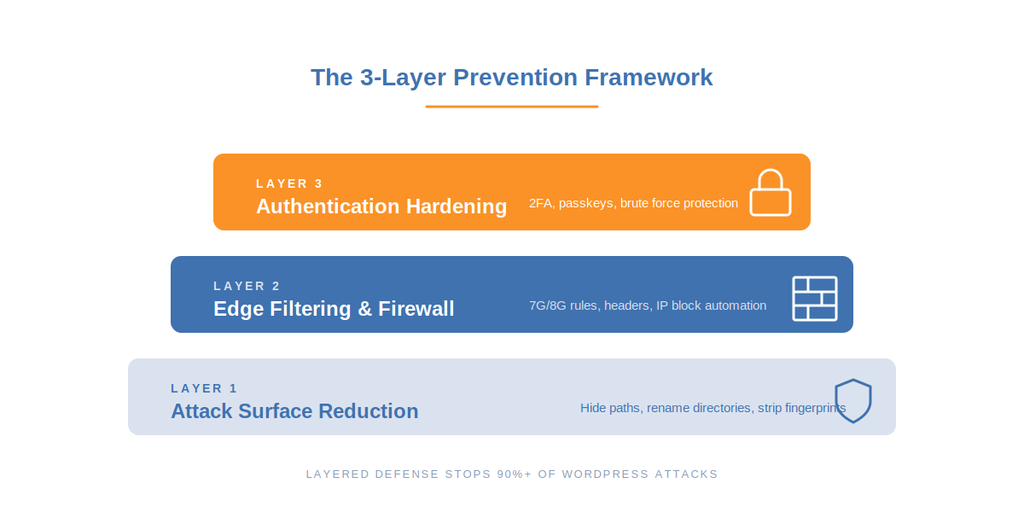
Real prevention works in layers. No single tool stops every attack. But three layers stacked together stop the overwhelming majority of them.
Layer 1: Reduce the Attack Surface
Automated scanners identify WordPress sites by looking for fingerprints: the /wp-login.php path, the readme.html file in root, version numbers in generator meta tags, plugin signatures in CSS and JavaScript files, the wp-content directory name. Strip those signals and mass-scanning tools can’t confirm you’re running WordPress. Most bots stop at that point and move to the next target.
This is what path security does. You change wp-admin to something bots don’t look for. You change wp-login.php to a custom path. You rename the wp-content and wp-includes folders. You strip the version number from meta tags. You hide the readme and license files that reveal your setup. Individually these are small changes. Together they remove the entire fingerprint that mass-exploitation scripts depend on.
Layer 2: Filter Traffic at the Edge
Not every bot follows a fingerprint script. Some probe directly. A firewall filters malicious requests before they reach WordPress, matching incoming patterns against known attack signatures and blocking the ones that look like exploits. This matters because standard hosting firewalls miss 87.8% of WordPress-specific exploits, they were built for broad traffic filtering, not application-layer semantics.
The 7G and 8G firewall rulesets are the standard for WordPress edge filtering in 2026. They cover SQL injection payloads, XSS patterns, file inclusion probes, directory traversal attempts, and automated vulnerability scans. Combined with IP blocking for repeat offenders and security headers that force the browser to behave, the firewall layer catches what Layer 1 didn’t deter.
Layer 3: Harden the Authentication Points
Even with a hidden login URL and a firewall in place, the login form itself is where the biggest breaches start. Brute force, credential stuffing, and phishing all target authentication. Two-factor authentication breaks the attack chain because a stolen password isn’t enough on its own. Passkeys go further: there’s no password to steal in the first place.
Rate limiting on the login form, reCAPTCHA on registration and password reset, and country-based restrictions for admin access complete the layer. The goal is to make authentication expensive for attackers, so even if they find your login page they can’t make enough attempts to matter.
How WP Ghost Maps to Each Prevention Layer
WP Ghost was built around the three-layer framework. Every feature maps to at least one layer, and the premium tier extends coverage into monitoring and automated response.
| Prevention Layer | WP Ghost Features | Attack Types Blocked |
|---|---|---|
| Layer 1: Attack Surface Reduction | Change wp-admin, wp-login.php, wp-content, wp-includes, uploads, admin-ajax paths. Hide plugin and theme names. Strip generator meta, RSD headers, WordPress version. Hide readme, license, wp-config. | Mass fingerprint scans, version-specific CVE exploits, plugin and theme targeted attacks, reconnaissance probes |
| Layer 2: Traffic Filtering | 7G Firewall, 8G Firewall, Security Headers (HSTS, CSP, X-Frame-Options), IP Blacklist and Whitelist, IP Block Automation (premium), Country Blocking (premium), Block Theme Detector bots, Block AI Crawlers (premium) | SQL injection, XSS, LFI, RFI, directory traversal, CSRF, clickjacking, automated vulnerability scans, AI content scraping |
| Layer 3: Authentication Hardening | Brute force protection with reCAPTCHA, 2FA by code, 2FA by email, 2FA by passkey (Face ID, Touch ID, Windows Hello), Magic Link Login, Temporary Logins, custom login redirects | Brute force, credential stuffing, stolen password reuse, phishing, session hijacking |
| Layer 4: Monitoring and Response | Security Threats Log (free limited, premium), User Events Log (free limited, premium), GEO Threat Map, email alerts, CSV export for compliance | Post-incident visibility, pattern detection, compliance reporting |
The free version covers all three prevention layers at a functional level. Premium extends each layer with automation (auto-block repeat offenders), geo-intelligence (block or filter by country), and visibility (full logs with filtering and export). For a complete breakdown of what’s in each tier, see WP Ghost Free vs Premium.
Layer 1 in Detail: Path Security
Path security is the foundation because it removes your site from the target pool for mass-exploitation scripts. The technique changes what bots see without changing how WordPress works under the hood. WP Ghost does this through rewrite rules and WordPress filters, never by renaming core files or folders on disk.
The paths worth changing, in rough order of impact:
- wp-login.php and wp-admin. The two most-scanned paths on the entire internet. See change the login path and hide wp-admin.
- admin-ajax.php. Used by almost every plugin, which makes it a reliable fingerprint. Change the admin-ajax path.
- wp-content, wp-includes, uploads. The directory names leak in every HTML source. See change wp-content, hide wp-includes, and change the uploads path.
- Plugin and theme directory names. Specific plugin folder names match known vulnerabilities. See hide plugin names and change theme paths.
- REST API wp-json and XML-RPC. Both are commonly abused for reconnaissance. See change REST API path and disable XML-RPC.
- Metadata footprint. Generator tags, version numbers, RSD links, style IDs. Hide the WordPress version and strip style and meta IDs.
A common objection: “security through obscurity doesn’t work.” That’s a misreading. Path security isn’t the only layer, it’s the first one. Combined with a firewall and 2FA, it reduces noise by 90% or more, which means the remaining layers handle far less traffic and can be more aggressive in their filtering.
For a step-by-step walkthrough of configuring every path at once, see Customize Paths in WP Ghost.
Layer 2 in Detail: Firewall and Edge Filtering
The firewall is the second gate. It sits between incoming requests and WordPress itself, matching each request against rulesets that know what an attack looks like. The 7G and 8G rulesets used in WP Ghost cover the attack types that dominate the vulnerability data: SQL injection payloads, XSS patterns, file inclusion attempts, directory traversal, malicious user agents, and automated scanners.
This matters because hosting-level protection alone leaves a massive gap. Server and network firewalls were designed to block broad categories of malicious traffic, like DDoS floods, port scans, and known malicious IPs. They weren’t designed to understand the application-specific semantics of a stored XSS vulnerability in version 3.4.1 of a specific WordPress plugin. Patchstack’s 2026 data shows 87.8% of WordPress-specific exploits bypass standard hosting defenses. An application-layer firewall closes that gap.
The 7G ruleset is the lightweight option for low-traffic sites and older hosts. The 8G ruleset extends coverage with modern attack patterns and is the default recommendation for most sites. Both run at the server edge, which means malicious requests are blocked before PHP even loads. This keeps your server fast under attack.
Security headers add a browser-side layer. Strict-Transport-Security forces HTTPS, Content-Security-Policy limits where scripts can load from, X-Frame-Options prevents clickjacking, X-Content-Type-Options stops MIME sniffing. None of these block requests at the server, but they stop a whole class of attacks that rely on the browser trusting mixed content or injected scripts. See the header security guide for recommended policies.
On Premium, IP Block Automation closes the loop. When the same IP trips firewall rules repeatedly, WP Ghost auto-blocks it at the server level for a configurable duration. This turns a single attack attempt into a permanent block for that source. The Firewall and Geo Security guide covers the full configuration.
Layer 3 in Detail: Authentication Hardening
The login form is where most successful WordPress breaches end. Even when everything else is configured correctly, a weak password on a high-privilege account can undo the whole stack. Authentication hardening closes this gap.
Three authentication methods matter in 2026:
2FA by code. A time-based one-time code from Google Authenticator, Authy, Microsoft Authenticator, or any TOTP app. Standard, works offline, widely supported. Covered in setting up 2FA with mobile apps.
2FA by email. A code sent to a pre-registered email address on each login. Useful for users without smartphones, but weakest link if email is compromised.
2FA by passkey. Face ID, Touch ID, Windows Hello, or a hardware key like YubiKey. Eliminates phishing and credential theft entirely because there’s no password to steal. This is the strongest method available in WordPress today. Full setup in the Two-Factor Authentication guide.
Below 2FA, the basics still matter. Brute force protection with attempt limits and reCAPTCHA blocks the volumetric attacks before they ever reach the password check. See the brute force attack protection guide for thresholds that work in practice.
For users who don’t want to manage passwords at all, Magic Link Login sends a one-time login link to a trusted email. For contractors, developers, and agencies that need short-lived access, Temporary Logins create time-limited accounts that expire automatically.
Layer 4 in Detail: Monitoring and Response
Prevention works better when you can see what it’s blocking. WP Ghost’s logging features are not a separate security layer so much as a visibility layer on top of the three active layers.
The Security Threats Log records every blocked attack in real time: the attack type, source IP, user agent, target path, and timestamp. The User Events Log tracks user-side activity: logins, role changes, setting modifications, plugin activations. Together they give you the full picture of what’s happening on your site, both on the outside (attacks) and the inside (users).
In version 9.0, the GEO Threat Map visualizes blocked attacks by country on the Overview dashboard. Click any country and you see the filtered log for that region over the last 7 days. This is how you spot regional attack patterns and decide whether country blocking makes sense for your audience.
For compliance or incident response, both logs export to CSV. For automation, email alerts can trigger on risky events (failed logins from new countries, admin account creation, plugin activation). Full configuration in the Security Monitor guide.
The WordPress Hack Prevention Checklist (2026)
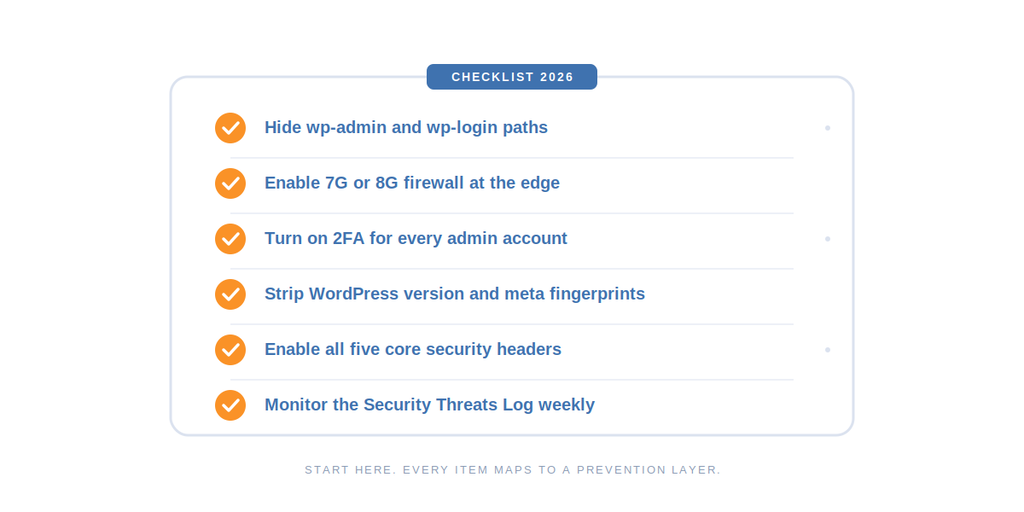
If you want a concrete starting point, work through this in order. Every item maps to a layer above.
- Change wp-login.php to a custom URL and bookmark it.
- Change wp-admin to a non-default path.
- Change the wp-content, wp-includes, and uploads directory names as seen by the public.
- Change admin-ajax.php to hide the primary AJAX fingerprint.
- Hide plugin and theme directory names, with randomized per-plugin and per-theme renames if possible.
- Strip the WordPress version from generator meta tags, RSD headers, and style IDs.
- Hide readme.html, license.txt, wp-config.php, and debug.log from public access.
- Enable the 7G or 8G firewall at the server edge.
- Enable all five core security headers: HSTS, CSP, X-Frame-Options, X-Content-Type-Options, X-XSS-Protection.
- Enable brute force protection with reCAPTCHA on login, register, lost password, and comments.
- Enable 2FA for every admin account. Prefer passkey over code over email in that order.
- Disable XML-RPC unless you actively need it for Jetpack or a mobile app.
- Disable the REST API for non-authenticated users if your site doesn’t rely on public API calls.
- Block AI crawlers if you publish original content you don’t want scraped for model training.
- Set up the Security Threats Log to record what’s being blocked in real time.
- Enable IP Block Automation so repeat offenders get blocked at the server level without manual intervention.
- Use Country Blocking if your audience is regional and your logs show heavy attack traffic from countries you don’t serve.
- Run the Website Security Check page to verify file permissions, database prefix, SALT keys, and weak admin usernames.
- Keep WordPress core, plugins, and themes updated. Prevention reduces the impact of unpatched vulnerabilities, but it doesn’t eliminate them.
- Maintain off-site backups. Prevention stops most attacks, but disaster recovery covers the edge cases.
For a one-click version that applies the recommended settings for your site type, see Preset Security Options.
What Hack Prevention Can’t Do
Being honest about the limits is part of the positioning. Prevention tools like WP Ghost do specific things well and don’t try to do things they aren’t designed for.
Prevention is not malware scanning. If you’re already infected, WP Ghost doesn’t detect or remove the malicious files. You need Wordfence, Sucuri, MalCare, or a similar scanner for post-infection cleanup. After cleanup, WP Ghost prevents reinfection by closing the entry point the attacker used.
Prevention is not a backup. No matter how good the lock on the door, sometimes the house burns down. Off-site backups with a tool like UpdraftPlus, BlogVault, or your host’s daily snapshots are non-negotiable. Prevention reduces how often you need them. It doesn’t replace them.
Prevention is not hosting security. Your host controls the server, the network, and the underlying OS. A compromised server undoes everything at the application layer. Choose a host with server-level firewalls, isolated accounts, and a track record of responding fast to incidents. That said, hosting firewalls alone miss 87.8% of WordPress-specific exploits, which is why you need the application-layer firewall on top.
Prevention can’t patch unpatched plugins. If a plugin has a publicly disclosed vulnerability and you haven’t updated, the firewall can catch some exploitation attempts but not all. With 46% of vulnerabilities having no patch available at the time of public disclosure, update promptly when patches ship and consider Patchstack or similar virtual patching services to cover the window between disclosure and your next update cycle.
Combining WP Ghost with Other Security Tools
WP Ghost is designed to run alongside other security plugins, not replace them. The most common effective stacks in 2026:
WP Ghost + Wordfence. WP Ghost hides the attack surface and handles edge filtering. Wordfence adds malware scanning and live traffic inspection. See WP Ghost with Wordfence compatibility notes.
WP Ghost + Sucuri. WP Ghost handles the application layer. Sucuri provides the cloud WAF, DDoS protection, and incident response. Configuration notes in WP Ghost with Sucuri.
WP Ghost + Solid Security. Overlap is larger (both handle 2FA and brute force), but each adds value. Guide at WP Ghost with Solid Security.
WP Ghost + Patchstack. WP Ghost reduces attack surface and filters traffic. Patchstack handles vulnerability intelligence and virtual patching for plugins you can’t update immediately.
The full compatibility list covers 50+ plugins at WP Ghost compatible plugins.
Getting Started with WP Ghost Hack Prevention
If you’re configuring WP Ghost for the first time, the fastest path to full prevention is:
- Install WP Ghost (free from WordPress.org or download Premium from your account).
- Open the Overview dashboard and note your starting Security Optimization Score.
- Go to Preset Security Options and pick a preset that matches your risk tolerance. Start with the middle tier if you’re unsure.
- Bookmark your new login URL immediately. The default wp-login.php stops working after the preset is applied.
- Run the Security Check and work through any remaining items.
- Enable 2FA on every admin account.
- Monitor the Security Threats Log for a week to see what’s being blocked.
- For production sites, review the settings best practice guide before going deep on customization.
For a complete step-by-step setup, the main WP Ghost tutorial walks through every menu section with screenshots.
Frequently Asked Questions
Can a WordPress site really be hack-proof?
No site is hack-proof, and anyone who tells you otherwise is selling something. What you can realistically achieve is a site that’s harder to attack than average. Since roughly 90% of attacks are opportunistic bot traffic running mass-exploitation scripts, a site that doesn’t match the expected fingerprint falls out of the target pool for most of them. The remaining 10% of targeted attacks still need layered defense, but the volume drops dramatically.
Does hiding wp-admin actually work, or is it just security through obscurity?
It works, but not on its own. Hiding wp-admin removes your site from the target list for the automated scripts that brute force the default path, which is 90%+ of login attack traffic. It doesn’t stop a determined attacker who’s specifically targeting you, which is what the “obscurity isn’t security” critique refers to. Combined with 2FA, a firewall, and attempt limits, hiding the login path is the first and cheapest layer of a real defense. Every real-world security framework, including NIST, uses the same layered approach.
Will WP Ghost slow down my WordPress site?
No. WP Ghost operates through rewrite rules and WordPress filters, not database scans or file crawls. The firewall runs at the server edge, which blocks malicious requests before PHP loads. In most cases WP Ghost reduces server load during attack spikes because bots that would have hit WordPress are blocked earlier in the request chain.
Do I still need WP Ghost if my host has server-level security?
Yes. Host security operates at the server and network layer (DDoS, IP reputation, server-level firewalls). Those tools miss 87.8% of WordPress-specific exploits because they weren’t built to understand application-layer semantics. WP Ghost operates at the application layer (WordPress-specific paths, authentication, plugin and theme fingerprinting). Both layers are needed. The best-known hosting providers (Kinsta, WP Engine, SiteGround) all work alongside WP Ghost, and most recommend application-level hardening as part of the shared responsibility model.
Is WP Ghost compatible with WooCommerce?
Yes. WP Ghost is tested with WooCommerce and protects the checkout, cart, and customer account flows the same way it protects any other front-end. The My Account and Checkout pages keep working after path security is applied. WooCommerce REST API endpoints can be exposed selectively if your setup requires it.
Does hack prevention hurt SEO?
No. Path security only affects private URLs like wp-admin and wp-login.php, which search engines never index. Your public URLs, sitemaps, robots.txt, and schema output stay unchanged. The 2FA and firewall layers also have no public-facing impact. If anything, prevention helps SEO indirectly because a hacked site that gets blacklisted by Google takes weeks to recover in rankings, and prevention reduces that risk.
How much does a WordPress hack actually cost?
The average total recovery cost for a small business hit by a WordPress hack runs around $14,500. That figure covers malware removal, emergency developer time, downtime, lost revenue, and the SEO work required to undo injected spam links and Google manual penalties. Proactive protection costs a fraction of that per year. For the full cost breakdown and data sources, see our WordPress Security Statistics 2025-2026 research.
How much does WordPress hack prevention cost?
The core prevention layers (path security, 7G/8G firewall, security headers, brute force protection, all three 2FA methods) are available in WP Ghost free. Premium features extend into automation (IP Block Automation), geo-intelligence (Country Blocking), full security logs, and advanced path hardening. Current Premium pricing is on the WP Ghost pricing page. For most personal sites, the free tier covers the prevention fundamentals.
What if I get locked out after enabling WP Ghost?
The emergency disable procedure is documented at disable WP Ghost in case of error. It takes under a minute via FTP or your hosting file manager and restores default WordPress paths instantly. We also recommend bookmarking your new login URL the moment you save a new path, and keeping a second admin account with a separate recovery email.
Does WP Ghost replace Wordfence or Sucuri?
No, and it’s not designed to. WP Ghost focuses on hack prevention through attack surface reduction and edge filtering. Wordfence and Sucuri focus on malware detection, post-infection cleanup, and threat intelligence. The three tools solve different problems and run well together. If budget forces a choice, WP Ghost comes first because prevention reduces how often you need cleanup. Once you’re stable, add a scanner.
Does WP Ghost modify WordPress core files?
No. WP Ghost never touches WordPress core files. It uses rewrite rules, filters, and a mapping engine to redirect requests and hide the real paths. Core, plugins, and themes stay untouched, which means updates apply normally and nothing breaks when you deactivate the plugin.
Related Tutorials
If you want to dig deeper into any specific layer, these are the most commonly referenced tutorials from this guide:
- WordPress Security Statistics 2025-2026 (43 verified data points)
- Complete WP Ghost setup tutorial
- Customize WordPress paths (Layer 1)
- Firewall and Geo Security (Layer 2)
- Security headers guide (Layer 2)
- Two-Factor Authentication (Layer 3)
- Brute Force Protection (Layer 3)
- Security Threats Log (Layer 4)
- User Events Log (Layer 4)
- Website Security Check
- WP Ghost Free vs Premium
- WP Ghost settings best practice