
WordPress Firewall: What It Does, What It Should Cost, and How to Set One Up
August 17, 2026
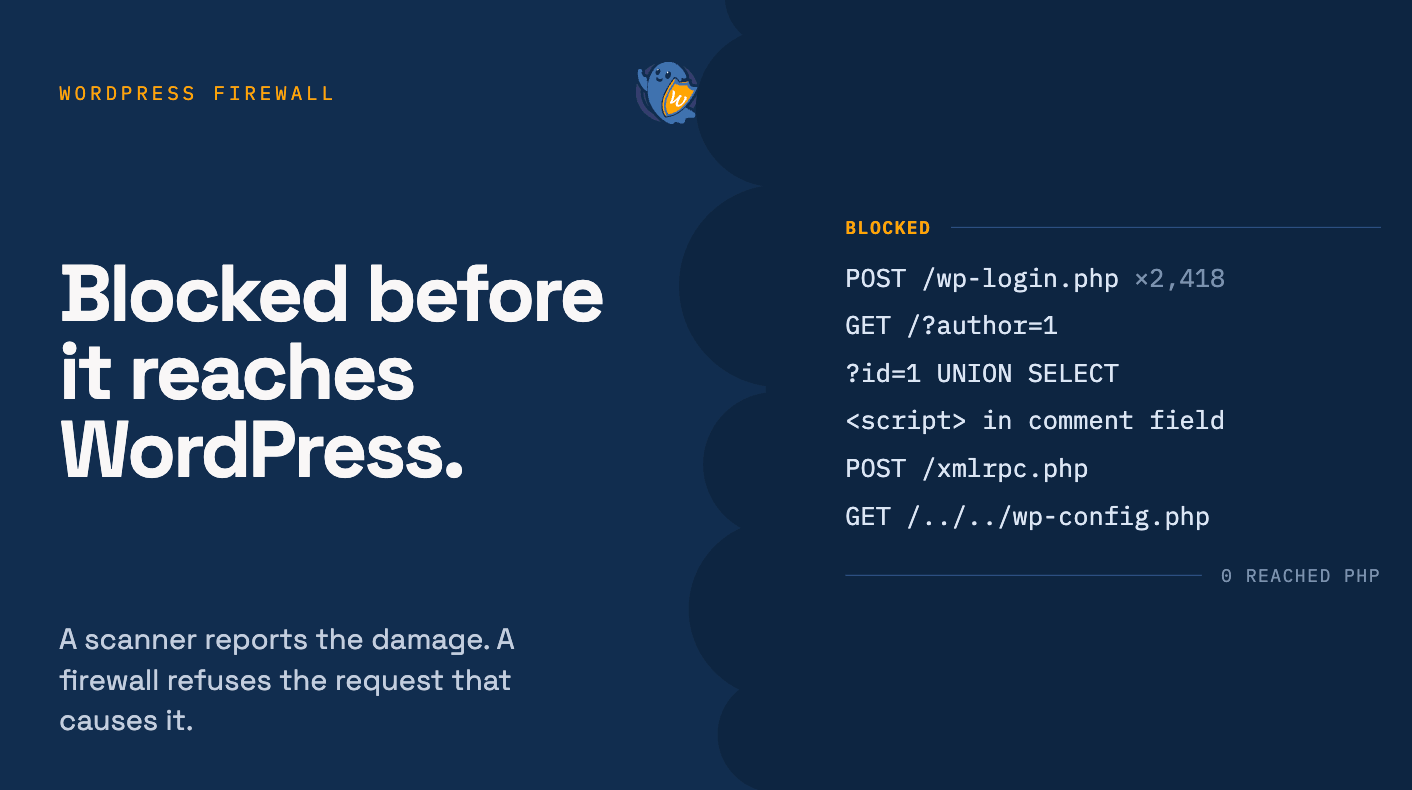
Open your server logs for sixty seconds and watch what’s already happening. Thousands of requests hammering wp-login.php with password guesses. Bots probing /?author=1 to harvest usernames. Strings full of UNION SELECT and <script> aimed at any form they can find. Your site is still up, but it’s being tried, constantly, by automated traffic that never sleeps and never gets bored.
A WordPress firewall is the wall that turns those requests away before they reach WordPress at all. It isn’t a scanner that tells you after the fact that something got in. It’s a filter that sits in front of your site and refuses the bad request in the first place. This guide explains, in plain terms, what that firewall actually does, the three types you’ll be choosing between, what a fair price looks like in 2026, and how to switch one on this afternoon.
WordPress runs around 43% of all websites, which is exactly why it’s the internet’s favorite target for mass, automated attacks. A firewall is the first layer to add against them.
What is a WordPress firewall (and what it actually does)
A WordPress firewall is a Web Application Firewall (WAF) that inspects every incoming request and blocks the malicious ones (SQL injection, cross-site scripting, brute-force logins, and bad bots) before they ever reach your WordPress site.
A firewall, specifically a Web Application Firewall (WAF), inspects every incoming request and decides whether to let it through, challenge it, or block it, based on what the request is trying to do. A malware scanner looks inside your site for damage that already happened. A firewall stops the request that would cause the damage. You want both, but the firewall is the one that prevents the incident rather than reporting it.
A good WordPress firewall blocks the attack patterns that make up the overwhelming majority of real-world hits:
- SQL injection: malicious database queries smuggled through forms and URLs.
- Cross-site scripting (XSS): injected scripts that hijack sessions or deface pages. XSS is consistently the single most-reported WordPress vulnerability class year after year.
- File inclusion and directory traversal: attempts to load or read files they shouldn’t.
- Brute-force login attempts: the endless password guessing against your admin.
- Bad bots and scrapers: automated traffic probing for known weak spots.
The point is coverage before contact. Every request that the firewall refuses is one that never reaches your plugins, your theme, or your database.
The three types of WordPress firewall (and which you actually need)
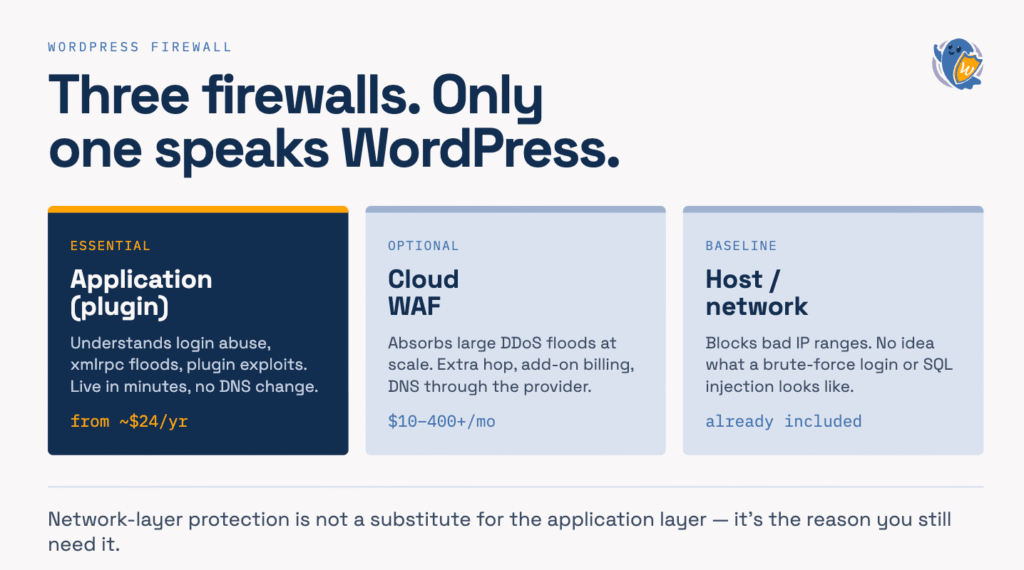
“Firewall” gets used for three different things. Knowing which is which saves you from paying for the wrong one.
Application firewall (plugin-level)
Runs at the level of your WordPress site, usually as a plugin, and understands WordPress-specific attacks: login abuse, plugin exploits, xmlrpc floods, path probing. It’s the cheapest and fastest to deploy, needs no DNS changes, and protects the application layer where most WordPress attacks actually land. For the large majority of sites, this is the layer that matters most.
Cloud / managed WAF
Sits in front of your site as a proxy, filtering traffic before it ever reaches your host. Its strength is scale: it can absorb large DDoS floods and filter enormous request volumes. Its costs are also higher, it adds a network hop, and it requires routing your DNS through the provider. Worth it for high-traffic or high-risk sites; overkill for a typical business site or blog.
Host / network firewall
The firewall your hosting company runs at the server or network level. It handles crude network-layer threats but generally has no idea what a WordPress login-brute-force or an xmlrpc amplification attack looks like. Useful, but not a substitute for application-layer protection. We come back to this objection below.
For most WordPress owners the honest answer is: start with an application firewall, add a cloud WAF only for scale, and the host firewall is a baseline you already have and shouldn’t rely on alone.
What a WordPress firewall should cost in 2026 (price ranges)
Here’s the money question, because it’s the one you’re actually searching. Firewall pricing is all over the map, and a lot of that spread is margin, not protection. Current market ranges look like this:
- Free plugin firewalls: $0, but with real limits. The most common one is that new firewall rules and malware signatures are delayed around 30 days behind the paid feed, precisely the window when a fresh exploit is most dangerous.
- Premium plugin firewalls (annual): roughly $119/year at entry level, ~$490/year mid-tier with hands-on monitoring, and ~$950/year for premium incident-response plans, per 2026 WAF pricing data.
- Cloud / managed WAF (monthly): from about $10–20/month for low-traffic sites, $115–200/month at medium traffic, and $400+/month for enterprise. Bot management, API protection, and DDoS mitigation are frequently billed as separate add-ons on top.
Now put that next to what a typical site needs. You are not a bank. You need current application-layer rules, brute-force protection, bad-bot filtering, and sane defaults. You don’t need a four-figure annual subscription or a per-traffic cloud bill.
That gap is the whole argument for a bundled hardening-plus-firewall plugin. Hide My WP Ghost pricing starts at $49/year for a single site and $119/year for five, and that includes the 2026 Ghost Firewall, brute-force blocking, country blocking, security headers, and two-factor authentication. Almost everywhere else, those features live in the “premium subscription” tier. The single-site price sits below the entry level of the premium plugin range above, while covering the protections most sites will ever use. Compare the full feature list against whatever your current security solution charges annually; the delta is usually the point.
The honest caveat: cheaper isn’t automatically better, and no firewall replaces updates, strong passwords, and backups. But paying enterprise WAF prices for a small-business site is a common, avoidable mistake. You’re buying scale you’ll never use.
How to set up a WordPress firewall in 6 steps
You can have application-layer protection live in a few minutes. The steps below map to Hide My WP Ghost, but the sequence is the same for any capable firewall.
- Choose a firewall level. Go to WP Ghost > Firewall and set Firewall Strength to 2026 Ghost Firewall, the recommended level and the default on new installs. If a rule ever conflicts with a plugin, step down to 8G or 7G and re-test. See the 8G firewall protection for what changed from the 7G firewall for WordPress.
- Turn on automatic IP blocking. Let the firewall ban IPs that trigger repeated attacks automatically, so brute-force sources take themselves out instead of needing your attention.
- Add security headers and strip server info. Enable the security-headers set (HSTS, Content-Security-Policy, X-Frame-Options and the rest) and remove the headers that leak your PHP and server versions. Both tighten the surface an attacker sees.
- Block bad bots and detector crawlers. Filter aggressive scrapers, AI crawler bots, and the technology detectors (Wappalyzer, BuiltWith, WhatCMS) that fingerprint your stack. This ties your firewall into the same work as hiding WordPress from detectors.
- Restrict by geography if it fits. If you never sell to certain regions, use country blocking to drop traffic from them. It’s a blunt but effective way to cut attack volume.
- Verify it’s working. Run a website security check to confirm the rules are active, then watch your logs for a day. You should see blocked requests climbing and the noise against
wp-login.phpdropping.
Pair the firewall with the basics that reduce the attacks it has to handle: brute-force protection and changing your wp-admin URL so the login bots have nothing to hammer in the first place.
What to look for in a WordPress firewall
If you’re comparing options, judge them on protection and honesty, not on how loud the marketing is. A firewall worth paying for should give you:
- Current application-layer rules covering SQL injection, XSS, file inclusion, and directory traversal, updated without a long delay.
- Brute-force and login protection, ideally with automatic IP banning.
- Bad-bot and fingerprint-crawler blocking, so scanners can’t map your stack.
- Geo and IP controls for cutting attack volume you’ll never do business with.
- Security headers applied for you, not left as a manual chore.
- Low performance overhead: protection shouldn’t cost you page speed.
- Transparent, flat pricing: a predictable annual number, not a bill that climbs with your traffic or hides core protection behind add-ons.
“My host already has a firewall. Isn’t that enough?”
This is the most common reason people skip application-layer protection, and it’s a costly misread. Your host’s firewall works at the network level: it’s good at crude things like blocking known-bad IP ranges and absorbing some traffic floods. It has essentially no understanding of WordPress. It doesn’t know that fifty POSTs to wp-login.php in a minute is a brute-force attack, that a request to xmlrpc.php is an amplification attempt, or that a query string carrying UNION SELECT is SQL injection aimed at your database.
Those are application-layer attacks, and they’re where WordPress actually gets breached. A network firewall and a WordPress-aware application firewall solve different problems. Having the first is not a reason to skip the second. It’s the reason you still need it.
Will a firewall slow my site down?
A well-built application firewall adds negligible overhead. It inspects request patterns, which is cheap, and it often improves real-world performance by dropping bad-bot traffic that was consuming your server’s resources. If a firewall noticeably slows your site, that’s a sign of a poorly optimized ruleset, not a law of nature. Test your page speed before and after; on most sites the difference is invisible to visitors and the bot noise on your server drops sharply.
Where to start
Those thousands of attempts in your logs aren’t going to stop. Automated attacks are the background radiation of running WordPress. What you control is whether they reach your site or hit a wall. An application firewall is that wall, and it does not require an enterprise budget: the protection most sites need costs a few dollars a month, not a couple hundred. Turn it on, verify it’s blocking, and move the attacks from “constant risk” to “someone else’s problem.” Start with the firewall and security features and pick a plan that fits the number of sites you run.
Frequently asked questions
Do I need a firewall if I already have a security plugin?
Check what your current security solution actually does. Many popular plugins lead with malware scanning, which reports damage after it happens, while real-time firewall rules sit behind a higher-tier subscription. If your protection is scan-and-alert rather than filter-and-block, you have a gap a firewall fills. The two jobs are complementary, not redundant.
Is a free WordPress firewall good enough?
For a low-stakes personal site, a free firewall is far better than none. The catch on most free tiers is a delay: new firewall rules and malware signatures arrive around 30 days after paid users get them, and that lag is exactly when a freshly disclosed exploit is being mass-exploited. If your site handles customers, payments, or leads, the modest annual cost of current rules is cheap insurance.
Application firewall or cloud WAF: which do I need?
For most sites, start with an application (plugin-level) firewall. It understands WordPress-specific attacks, deploys in minutes, and needs no DNS changes. A cloud WAF is an upgrade for high-traffic or high-risk sites that need to absorb large DDoS floods, and it costs more and adds a network hop. Start with the application firewall; add a cloud WAF only if your traffic needs it.
Will a firewall block my real visitors or hurt SEO?
A properly configured firewall targets malicious request patterns, not ordinary browsing, so real visitors pass through untouched and search crawlers are allowed by default. The risk comes from over-aggressive custom rules or geo-blocking a region you actually serve. That’s why you verify with a security check and review your logs after switching it on.
How much should I pay for a WordPress firewall?
For a typical site, a bundled hardening-and-firewall plugin in the range of roughly $49–119 per year covers the protection you’ll actually use. Premium standalone plugins run about $119–950/year and cloud WAFs $10–400+/month. Those figures make sense at high traffic or high risk, but are more than most small and mid-size sites need.