7G Firewall for WordPress – Server-Level Protection with WP Ghost
March 3, 2023
This tutorial has moved to the new WP Ghost Knowledge Base where each feature is presented in detail.
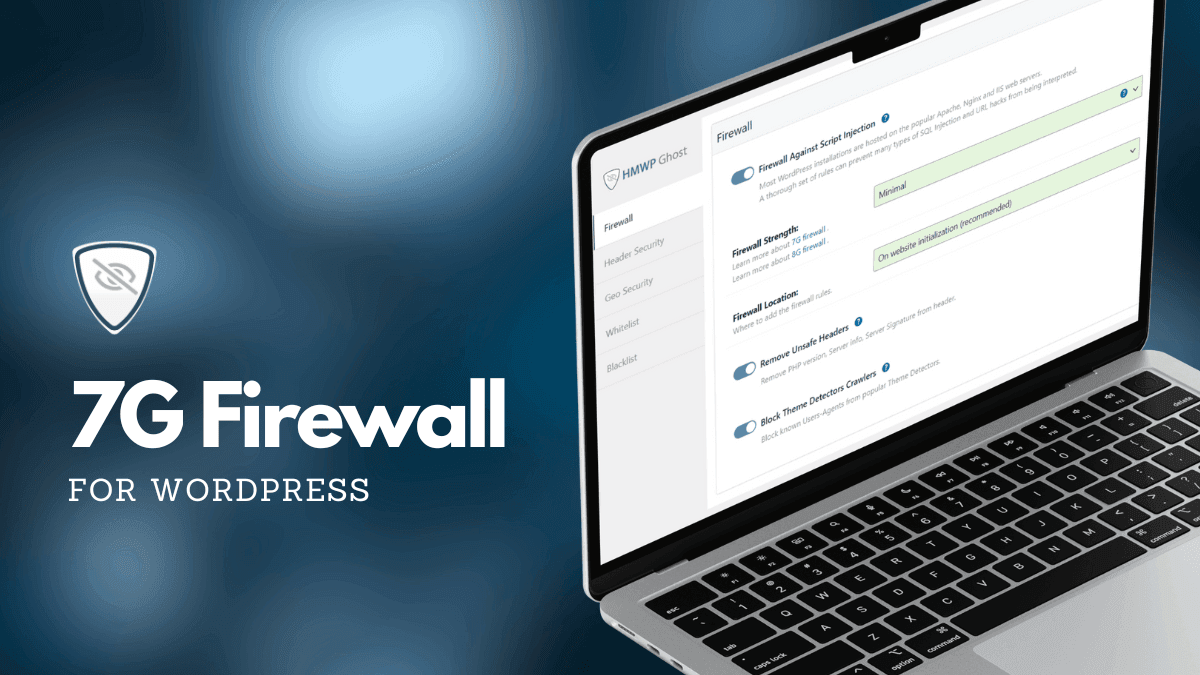
Activate the 7G Firewall in WP Ghost for server-level protection against SQL injection, script injection, XSS, and malicious bot traffic. The 7G ruleset blocks attacks before WordPress, PHP, or any plugin code executes.
What Is the 7G Firewall
The 7G Firewall is a set of server-level security rules created by Jeff Starr of Perishable Press. It is part of the G-series firewall rulesets (5G, 6G, 7G, 8G) that have protected millions of websites worldwide. WP Ghost integrates the 7G ruleset natively, so you do not need to manually edit any configuration files.
The 7G ruleset blocks malicious requests, bad bots, automated attacks, spam, SQL injection, and script injection attempts through lightweight server-level filtering. On Apache servers, the rules are placed in .htaccess, intercepting malicious requests before PHP even starts. On Nginx and LiteSpeed, the rules load during WordPress initialization. Either way, blocked requests never reach WordPress core, your plugins, or your database, and they consume minimal server resources.
What the 7G Firewall Blocks
The 7G ruleset filters incoming HTTP requests and blocks several categories of attacks as part of your hack prevention strategy:
SQL injection. Malicious queries that try to read, modify, or delete your database content. SQL injection is the most dangerous common attack – a successful one gives the attacker direct database access. The 7G ruleset blocks SQL injection patterns in URL parameters, POST data, and query strings.
Script injection and XSS. Attempts to inject JavaScript, PHP, or other executable code through URL parameters, form fields, or headers. These attacks try to execute code in visitors’ browsers (XSS) or on your server (remote code execution).
Directory traversal. Requests that use ../ sequences to navigate outside the web root and access sensitive server files like /etc/passwd or wp-config.php.
File inclusion exploits. Attempts to include remote or local files through URL parameters, which can lead to code execution or information disclosure.
Bad bots and automated scanners. Requests from known malicious user agents, vulnerability scanners, and automated attack tools.
Malicious query strings. Unusual HTTP methods, excessively long query strings, and request patterns that match known exploit toolkits.
7G vs. 8G – Which Should You Use
WP Ghost offers four firewall levels: Minimal, Medium, 7G, and 8G. The 8G Firewall is the recommended default. It includes all 7G protections plus updated patterns for modern attack techniques and fewer false positives. Use 7G in these specific situations:
When 8G causes a false positive. If a specific plugin feature, form submission, or admin action stops working after enabling 8G, the 8G-specific rules may be triggering on a legitimate request. Switch to 7G to confirm the issue is 8G-specific. If 7G works without the false positive, you can stay on 7G or whitelist the affected path and switch back to 8G.
When your server configuration has compatibility issues with 8G. Some older server configurations or custom hosting environments may not support all 8G directives. 7G has been deployed longer and tested across a wider range of server setups.
When you want maximum stability. 7G has been in production across millions of sites for years. Its ruleset is thoroughly vetted and extremely stable. If your priority is reliability over cutting-edge coverage, 7G delivers proven protection.
| Feature | 7G Firewall | 8G Firewall (Recommended) |
|---|---|---|
| SQL injection blocking | Yes | Yes, with updated patterns |
| Script injection and XSS | Yes | Yes, with updated patterns |
| Directory traversal | Yes | Yes |
| File inclusion exploits | Yes | Yes |
| Bad bot blocking | Yes | Yes, with expanded list |
| False positive rate | Low | Lower (refined rules) |
| Modern attack patterns | Up to 2021 | Updated for 2024-2026 |
| Best for | Fallback when 8G conflicts | All sites (recommended) |
How to Activate the 7G Firewall in WP Ghost
1. Go to WP Ghost > Change Paths. Select Safe Mode or Ghost Mode (Premium) and save. The firewall requires an active security level.
2. Go to WP Ghost > Firewall.
3. Switch on Firewall Against Script Injection.
4. Select 7G Firewall from the Firewall Strength list.
5. On Apache servers, choose where to place the rules: .htaccess (fastest, blocks at web server level before PHP loads) or WordPress initialization (broader compatibility, loads during WP init). On Nginx and LiteSpeed, the firewall loads during initialization automatically.
6. Click Save.
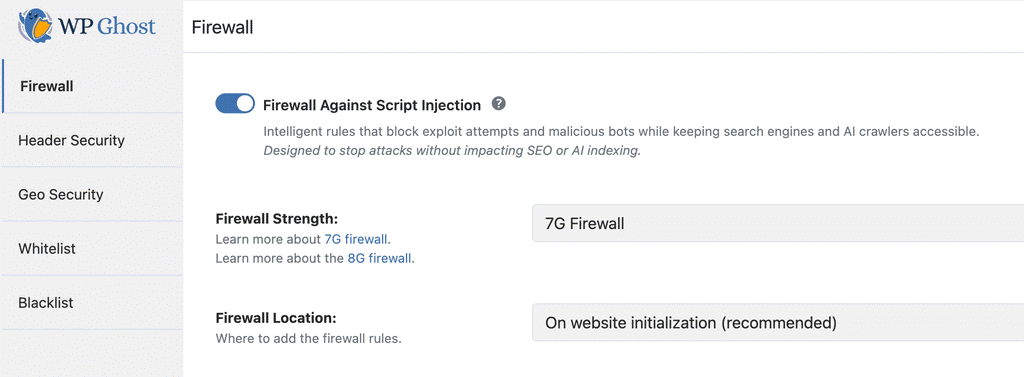
After activating, test your site thoroughly. Browse your key pages, submit any forms, test WooCommerce checkout (if applicable), and verify admin functions work correctly. If any legitimate functionality breaks, try switching to the Medium or Minimal firewall level.
How the Firewall Fits into Your Security Stack
The firewall is one layer in a complete hack prevention strategy. Path security makes your WordPress installation invisible to bots. The firewall catches whatever gets through – requests that are not targeting WordPress-specific paths but still contain malicious payloads. Together, they cover both the reconnaissance and exploitation phases of an attack.
For the complete firewall guide including IP Block Automation, header removal, theme detector blocking, and AI crawler blocking, see the Firewall Security tutorial. For the newer 8G ruleset, see the 8G Firewall Protection guide.
The firewall also works alongside other security plugins. WP Ghost’s firewall operates at the server configuration level (.htaccess) while plugins like Wordfence and Solid Security operate at the PHP/application level. They protect at different layers and complement each other without conflict.
Frequently Asked Questions
Should I use 7G or 8G?
Start with 8G. It is the latest generation with broader coverage and fewer false positives. Only switch to 7G if 8G causes a specific compatibility issue with a plugin or server configuration. Think of 7G as the reliable fallback: proven, stable, and thoroughly tested, but without the latest pattern updates that 8G includes.
Does the 7G Firewall affect performance?
It actually improves performance for sites under attack. Malicious requests are rejected at the server level with minimal resources. For legitimate traffic, the overhead is negligible. When placed in .htaccess, the rules execute before PHP starts, so blocked requests cost almost nothing to process. Thousands of malicious requests per minute are handled without impacting your legitimate visitors.
Is the 7G Firewall included in the free version of WP Ghost?
Yes. Both the 7G and 8G Firewall are fully included in the free version of WP Ghost with no limitations. The firewall is one of the 115+ free features available to all users.
Can I use this alongside Wordfence or Solid Security?
Yes. The 7G Firewall operates at the server/configuration level while Wordfence and Solid Security operate at the PHP/application level. They protect at different layers and complement each other without conflict.
Does the firewall affect SEO?
No. WP Ghost automatically whitelists major search engine crawlers (Googlebot, Bingbot, Yandex) when the 7G Firewall is active. Legitimate crawlers access and index your site normally.
Does this work with WooCommerce?
Yes. WooCommerce checkout, cart, AJAX, and payment processing work normally with the 7G Firewall enabled. If a specific WooCommerce action triggers a false positive, whitelist the affected path in WP Ghost > Firewall > Whitelist Paths.
Does WP Ghost modify WordPress core files?
No. The 7G rules are placed in .htaccess (Apache) or loaded through WordPress hooks (Nginx/LiteSpeed). No core files are modified. Disabling the firewall removes all rules instantly.