8G Firewall Protection for WordPress – How to Enable in WP Ghost
April 16, 2024
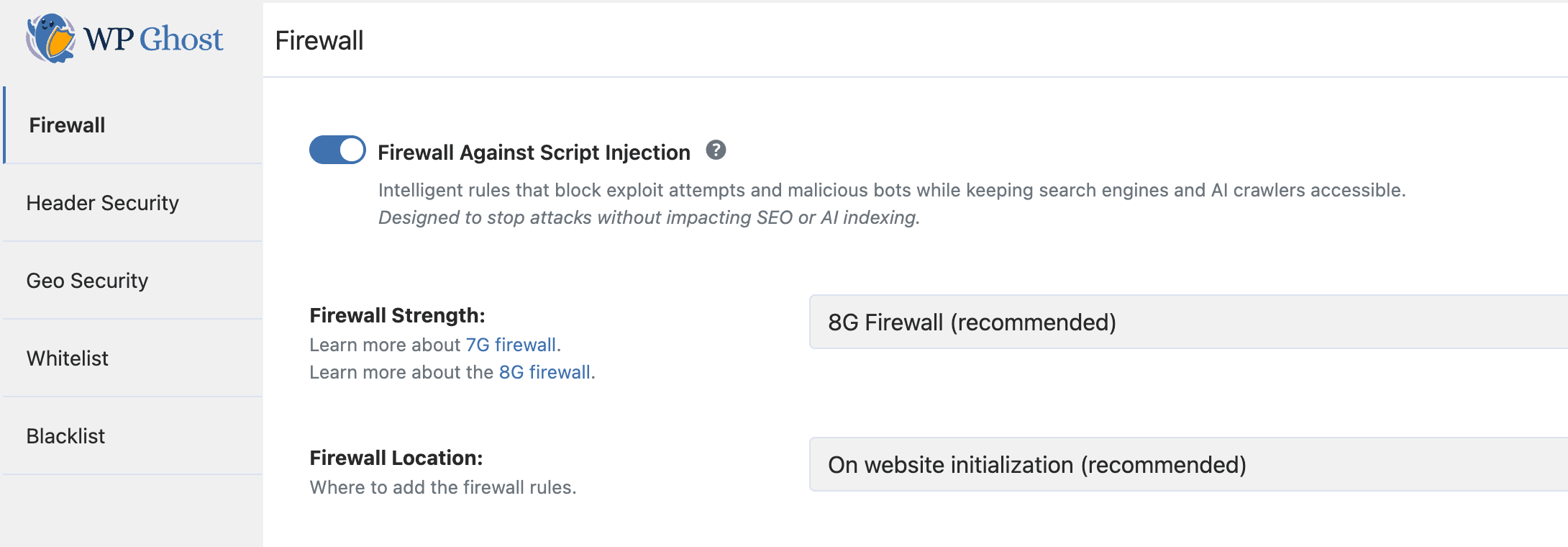
This tutorial has moved to the new WP Ghost Knowledge Base where each feature is presented in detail.
- Why your WordPress site needs a firewall
- What is the 8G Firewall
- What the 8G Firewall blocks
- Why choose 8G over other firewall levels
- How to enable the 8G Firewall
- Troubleshooting
- Frequently asked questions
- Should I use .htaccess or WordPress initialization?
- What is the difference between 7G and 8G?
- Can I use the 8G Firewall alongside another security plugin?
- Does the 8G Firewall affect site performance?
- Does this work with WooCommerce?
- Does the firewall affect SEO?
- Does WP Ghost modify WordPress core files?
- Related tutorials
Quick summary: The 8G Firewall is a server-level ruleset built into WP Ghost that blocks SQL injection, script injection, directory traversal, and exploit attempts before they reach WordPress. Enable it in WP Ghost > Firewall > Firewall Against Script Injection > 8G Firewall.
Why your WordPress site needs a firewall
Path security makes your site invisible to bots. The firewall makes it defended. Together, they form a complete hack prevention strategy.
SQL injection and script injection requests probe your site for database access, file inclusion, and code execution. Patchstack’s 2024 report found that 43% of WordPress vulnerabilities were exploitable without authentication. The 8G Firewall blocks these at the request level – the malicious query is rejected before it reaches any vulnerable code.
WP Ghost loads the 8G rules in one of two places, set under Firewall Location: On website initialization, the default and recommended option, or In .htaccess file on Apache and LiteSpeed, where the rules run before PHP starts. Nginx doesn’t read .htaccess. Either way, blocked requests never reach your pages, plugins or database.
What is the 8G Firewall
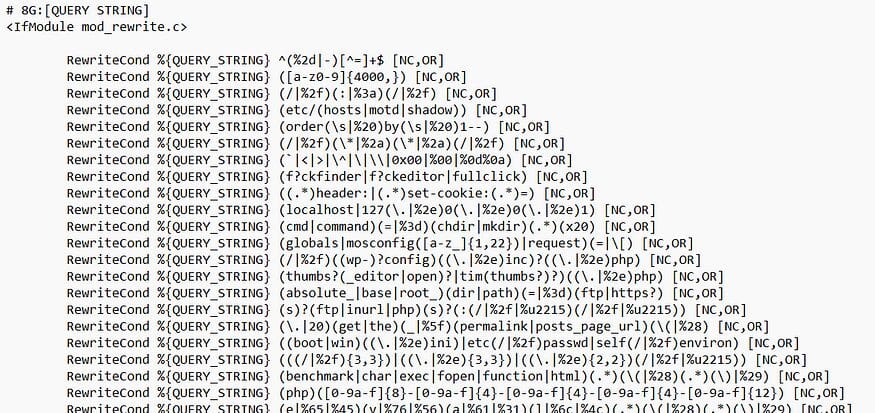
The 8G Firewall is a set of server-level security rules created and maintained by Jeff Starr of Perishable Press. It is the latest generation in his line of open-source firewall rulesets (5G, 6G, 7G, 8G). The “G” stands for “generation.” Each generation adds updated patterns to block newer attack techniques while removing false positives from older rules.
WP Ghost integrates the 8G ruleset natively. You do not need to manually edit configuration files or copy rules into .htaccess yourself. The plugin handles everything when you enable the feature.
What the 8G Firewall blocks
The 8G ruleset filters HTTP requests across multiple attack vectors. Here is what it catches:
SQL injection attempts. Malicious queries that try to read, modify, or delete your database content. A successful one can give the attacker direct database access. The 8G ruleset blocks SQL injection patterns in URL parameters, POST data, and query strings.
Script injection and XSS. Attempts to inject JavaScript, PHP, or other executable code through URL parameters, form fields, or headers. These attacks try to execute code in visitors’ browsers (XSS) or on your server (remote code execution). The 8G firewall blocks common injection patterns including encoded payloads.
Directory traversal. Requests that use ../ sequences to navigate outside the web root and access sensitive server files like /etc/passwd or wp-config.php.
File inclusion exploits. Attempts to include remote or local files through URL parameters, which can lead to code execution or information disclosure.
Bad bots and automated scanners. Requests from known malicious user agents, vulnerability scanners, and automated attack tools. The 8G ruleset maintains a list of suspicious user agent strings and blocks them outright.
Malicious query strings. Unusual HTTP methods, excessively long query strings, and request patterns that match known exploit toolkits.
Why choose 8G over other firewall levels
WP Ghost offers five firewall levels in the Firewall Strength dropdown. The 2026 Ghost Firewall, WP Ghost’s own ruleset, is the recommended level and the default on new installs. Here is how they compare:
| Firewall Level | Protection Scope | Best For |
|---|---|---|
| Minimal | Basic injection filtering | Maximum compatibility, troubleshooting |
| Medium | Extended pattern matching | Broader protection with good compatibility |
| 7G Firewall | Server-level filtering of injection and exploit patterns | Fallback if 8G causes false positives |
| 8G Firewall | Jeff Starr’s latest ruleset, updated patterns over 7G | Sites that want the 8G ruleset, or a fallback if 2026 Ghost Firewall causes false positives |
| 2026 Ghost Firewall (recommended) | WP Ghost’s own ruleset, also checks admin-ajax, REST API, form and comment submissions, file uploads | Default on new installs, most sites |
The 8G ruleset includes everything from previous generations plus updated patterns for newer attack techniques. Each generation refines the rules, so 8G drops some of the 7G rules that blocked legitimate requests. It also runs alongside a scan-based security plugin: the two run as separate filters and don’t block each other.
WP Ghost automatically whitelists major search engine crawlers (Googlebot, Bingbot, Yandex, and others) when the 8G Firewall is active. Your SEO and indexing are unaffected.
How to enable the 8G Firewall
Step 1: Activate a security level
Go to WP Ghost > Change Paths > Level of Security. Select Safe Mode (Lite Mode in WP Ghost free) or Ghost Mode (Premium) and click Save.
Step 2: Enable the 8G Firewall
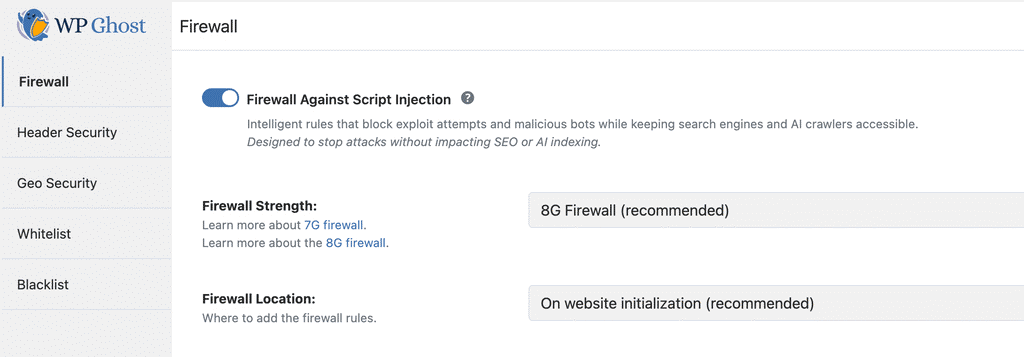
1. Go to WP Ghost > Firewall.
2. Switch on Firewall Against Script Injection.
3. Select 8G Firewall from the firewall level options.
4. Under Firewall Location, keep On website initialization (recommended) or choose In .htaccess file on Apache or LiteSpeed, where the rules run before PHP loads. On Nginx, the firewall loads on website initialization.
5. Click Save to apply.
Step 3: Test your site
After enabling the firewall, test your site thoroughly. Browse your key pages, submit forms, test checkout if you use WooCommerce, and verify that admin functions work correctly. The firewall works silently in the background – there is no visible change on the frontend for legitimate visitors.
Troubleshooting
A plugin feature or form stopped working after enabling 8G
This is usually a false positive – a legitimate request that matches an attack pattern. It can happen with plugins that use complex query strings or unusual URL parameters. Try switching to 7G Firewall to see if the issue resolves. If it does, add the affected path to WP Ghost > Firewall > Whitelist, in Whitelist Paths, and switch back to 8G.
The firewall does not seem to be blocking anything
The firewall works silently. It blocks requests before they reach WordPress, so there is no visible indication on the frontend. Check the Security Threats Log to see blocked requests. If logs show no blocks, your site has not received malicious traffic since enabling. This is normal for low-traffic sites or sites already protected by hosting-level firewalls.
Something broke and I need to recover
If you have lost access or something stopped working, check the emergency disable guide or add the HMWP_DISABLE constant in wp-config.php to disable WP Ghost temporarily.
Frequently asked questions
Should I use .htaccess or WordPress initialization?
On website initialization is the default and recommended option. In .htaccess file runs the rules before PHP starts on Apache and LiteSpeed; switch back if it causes compatibility issues. Nginx doesn’t read .htaccess. Both options block the same requests.
What is the difference between 7G and 8G?
The 8G ruleset adds updated patterns for newer attack techniques, removes false positives from 7G, and refines existing patterns. If 8G blocks something legitimate, fall back to 7G while you sort it out.
Can I use the 8G Firewall alongside another security plugin?
Yes. WP Ghost’s firewall and a scan-based security plugin run as separate filters on each request and don’t block each other.
Does the 8G Firewall affect site performance?
Blocked requests are rejected early, so they use little server time, and legitimate traffic sees no noticeable overhead. With the rules in .htaccess, a blocked request is rejected before PHP starts.
Does this work with WooCommerce?
Yes. If a specific WooCommerce feature triggers a false positive, whitelist the affected path in WP Ghost > Firewall > Whitelist, in Whitelist Paths.
Does the firewall affect SEO?
No. WP Ghost automatically whitelists major search engine crawlers (Googlebot, Bingbot, Yandex, and others) when the firewall is active. Legitimate crawlers access and index your site normally. Your rankings, sitemaps, and page indexing are unaffected.
Does WP Ghost modify WordPress core files?
No. The 8G rules are placed in .htaccess (Apache) or loaded through WordPress hooks (Nginx/LiteSpeed). No core, plugin, or theme files are modified. Disabling the firewall removes all rules instantly.
Related tutorials
Build your complete security stack with these related features:
7G Firewall for WordPress – The previous generation ruleset, use as a fallback if 8G causes compatibility issues.
Brute Force Attack Protection – Block login attacks with attempt limits and reCAPTCHA.
Header Security – Add Content-Security-Policy, HSTS, and other protective HTTP headers.
Security Threats Log – Monitor every blocked attack and exploit attempt in real-time.
Customize Paths in WP Ghost – The core path security feature that complements firewall protection.