How to Add Security Headers to WordPress with WP Ghost
June 17, 2024
This tutorial has moved to the new WP Ghost Knowledge Base where each feature is presented in detail.
Turn on security headers in WP Ghost with one toggle, in the free and premium versions. They tell the visitor’s browser how to treat your pages and help block cross-site scripting, clickjacking, MIME type sniffing and protocol downgrade attacks.
What are security headers
Security headers are directives included in the HTTP response from your web server. They tell the browser what it is allowed to do with your page content: which domains can load scripts, whether the page can be embedded in an iframe, whether to enforce HTTPS, and how to handle MIME types. Each header addresses a specific attack vector.
Without security headers, browsers apply default permissive policies. Attackers exploit these defaults to inject scripts, embed your pages in malicious iframes, or trick browsers into executing files with incorrect MIME types. Security headers close these gaps by setting explicit policies at the browser level.
WP Ghost sends the headers listed on its Header Security screen. The Add Security Header button adds more of them, and you can edit every value there.
Why security headers matter for hack prevention
WP Ghost’s 2026 Ghost Firewall blocks malicious requests on the server. Security headers protect at the browser level. They prevent attacks that happen after the page has loaded, like injected scripts executing in a visitor’s browser or your page being embedded in a phishing site. Together, they cover both sides of the connection.
SecurityHeaders.com grades your site by the headers it sends, and each missing header lowers the grade.
Once active, they apply to every response, and each one adds a single line to it. The header to revisit is Content-Security-Policy: when you add a new third-party script, add its domain to the policy.
How to enable security headers in WP Ghost
1. Go to WP Ghost > Firewall > Header Security.
2. Switch on Add Security Headers against XSS and Injection Attacks.
3. Click Save.
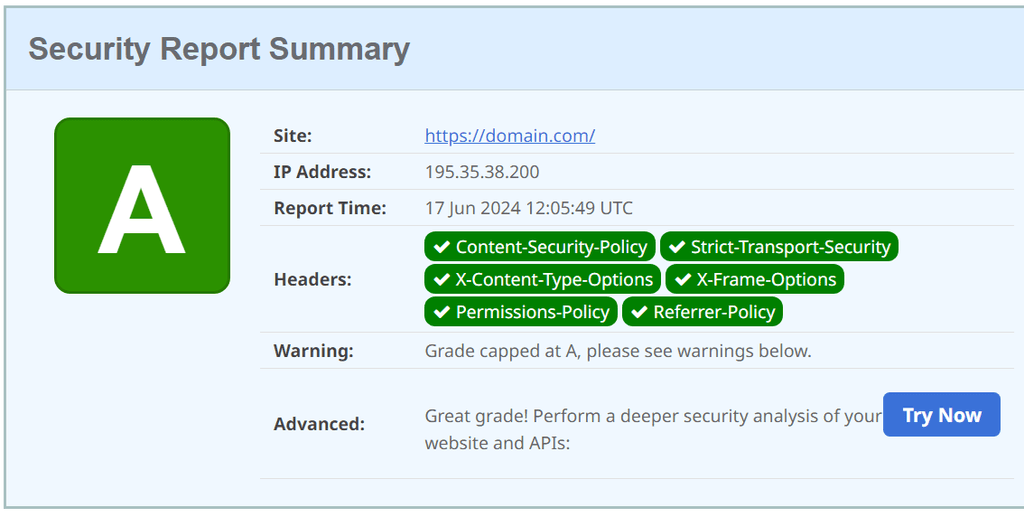
WP Ghost adds the headers through the server configuration file and PHP output. New installs start with Strict-Transport-Security and Content-Security-Policy, and the reference below covers the other headers you can add. After enabling, verify your headers at SecurityHeaders.com by entering your domain. You should see green marks for the headers you configured.
Security headers reference
Strict-Transport-Security (HSTS)
Forces browsers to access your site only over HTTPS, preventing protocol downgrade attacks and cookie hijacking. Once a browser receives this header, it will not make HTTP requests to your domain for the specified duration.
Strict-Transport-Security: max-age=31536000; includeSubDomains; preloadmax-age=31536000 sets the duration to 1 year in seconds. includeSubDomains applies the rule to all subdomains. preload requests inclusion in browsers’ built-in HSTS list for immediate enforcement even on the first visit.
Content-Security-Policy (CSP)
Controls which sources can load content on your pages, including scripts, stylesheets, images, fonts, and frames. Prevents XSS by blocking unauthorized script execution. It does more than any other security header, and it takes the most care to set up.
Content-Security-Policy: default-src 'self'; script-src 'self' https://apis.google.comdefault-src ‘self’ allows resources only from your own domain. script-src ‘self’ https://apis.google.com allows scripts from your domain and Google APIs. Customize the CSP based on which external services your site uses (analytics, fonts, payment gateways, live chat, etc.).
CSP requires careful configuration. A restrictive CSP can block legitimate third-party scripts like Google Analytics, payment gateways, or chat widgets. Test thoroughly after enabling. If a feature breaks, add the required domain to the appropriate CSP directive. WP Ghost lets you customize the CSP value directly.
X-Frame-Options
Prevents clickjacking attacks by controlling whether your page can be embedded in an iframe, frame, embed, or object element on other sites.
X-Frame-Options: SAMEORIGINDENY prevents all framing entirely. SAMEORIGIN allows framing only by your own domain. Use SAMEORIGIN if your site uses iframes internally, as some page builders and admin panels require this to function.
X-XSS-Protection (deprecated)
Don’t send this header. MDN marks X-XSS-Protection as deprecated and OWASP advises against it, because the old browser XSS filter it switched on could be abused to leak data. Older WP Ghost versions added it by default, so if it’s in your list on the Header Security screen, remove it with the X next to its name and click Save. Content-Security-Policy is the header that blocks XSS in current browsers.
X-XSS-Protection: 1; mode=blockThat is the value older setups send. Chrome removed its XSS filter in version 78, so the header has no effect there.
X-Content-Type-Options
Prevents MIME type sniffing, where browsers try to guess a file’s type regardless of the declared Content-Type. Without this header, an attacker could upload a malicious file disguised with an innocent extension and the browser might execute it.
X-Content-Type-Options: nosniffnosniff forces the browser to use the declared MIME type. No guessing, no interpretation, no execution of mistyped files.
Cross-Origin-Embedder-Policy (COEP)
Lets your page load resources from other domains only when they grant permission. It blocks data leaks through embedded content from other domains.
Cross-Origin-Embedder-Policy: require-corprequire-corp requires cross-origin resources to include a Cross-Origin-Resource-Policy header granting access. Resources without this header are blocked.
Cross-Origin-Opener-Policy (COOP)
Isolates your document from cross-origin windows, preventing attacks like cross-origin information leaks and Spectre-type side-channel attacks.
Cross-Origin-Opener-Policy: same-originsame-origin isolates the browsing context so cross-origin documents can not interact with your page through window.opener or similar mechanisms.
Troubleshooting
A third-party service stopped working after enabling headers. This is almost always caused by Content-Security-Policy blocking scripts from external domains. If Google Analytics, a payment gateway, live chat widget, or embedded video stops working, add the required domain to the appropriate CSP directive. WP Ghost lets you customize the CSP value directly in the Header Security settings.
Page builder preview or iframes not loading. If your page builder’s preview or an iframe embed stops working, the X-Frame-Options header is likely set to DENY. Change it to SAMEORIGIN to allow framing by your own domain while still blocking cross-origin framing.
SecurityHeaders.com still shows missing headers. Clear your server cache and CDN cache after enabling the headers. Some caching layers serve old cached responses that do not include the new headers. Also check if your hosting provider sets conflicting headers at the server level, which can override the ones WP Ghost adds.
Frequently asked questions
Which headers should I enable?
Start with Strict-Transport-Security and Content-Security-Policy. Add X-Content-Type-Options (nosniff) and X-Frame-Options (SAMEORIGIN) next, then check the pages that embed content or load in frames. Content-Security-Policy is the one that needs extra domains when you use third-party scripts. Leave X-XSS-Protection out: it’s deprecated.
How do I verify my headers are working?
Visit SecurityHeaders.com and enter your domain. It scans your HTTP response headers and grades each one. You can also check headers in your browser DevTools under the Network tab: select a request and look at the Headers section.
Do security headers affect performance?
No. Each header adds one line of a few dozen bytes to the HTTP response.
Do security headers affect SEO?
Not directly. Google uses HTTPS as a ranking signal, and HSTS keeps browsers on the HTTPS version of your site.
Are security headers included in the free version of WP Ghost?
Yes. The Header Security screen, with the toggle, the header list and the Add Security Header button, is in WP Ghost free.
Does WP Ghost modify WordPress core files?
No. Security headers are added through server configuration and PHP output. No core files are modified. Disabling the feature removes all headers instantly.