

Does WP Ghost Have 7G Firewall Protection?
This tutorial has moved to the new WP Ghost Knowledge Base where each feature is presented in detail.
Yes. WP Ghost includes the 7G and 8G Firewall rules by Jeff Starr and its own 2026 Ghost Firewall, which is the recommended level and the default on new installs. All three are free.
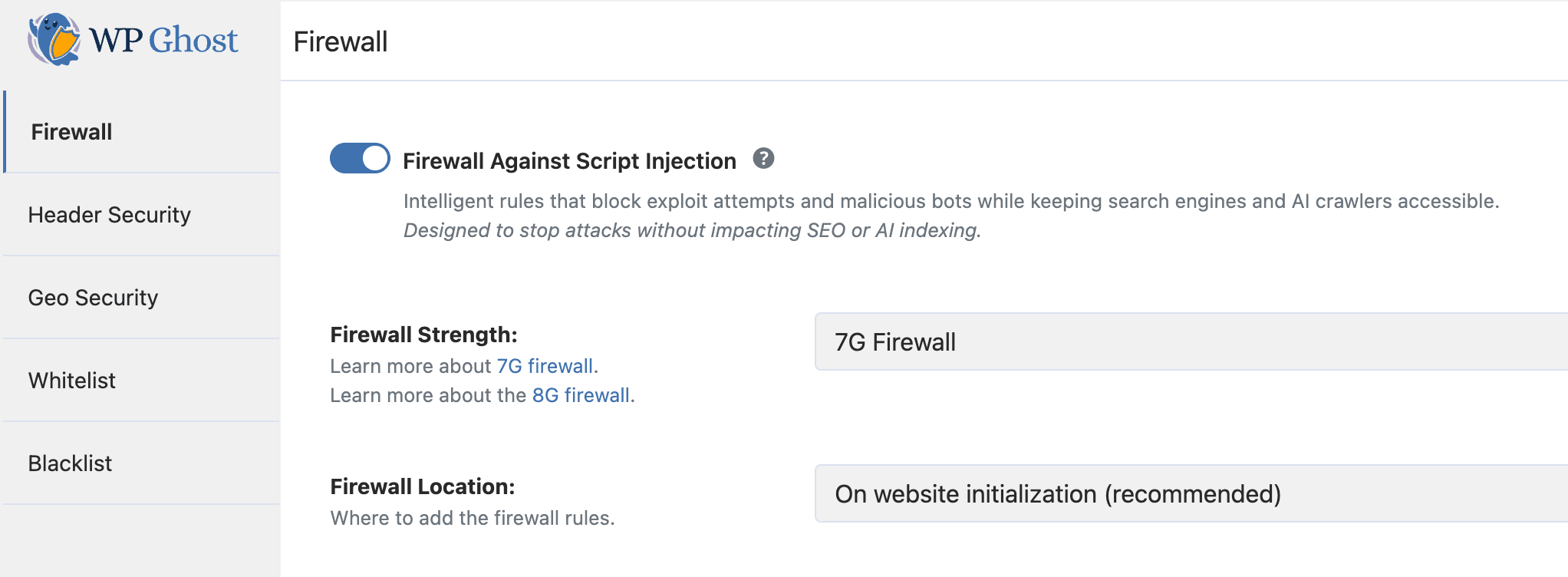
What is the 7G Firewall and what does it block?
The 7G Firewall is a set of server-level security rules created by Jeff Starr of Perishable Press. It belongs to the G-series firewall rulesets (5G, 6G, 7G, 8G). WP Ghost includes the 7G ruleset, so you don’t need to edit any configuration files by hand.
The 7G ruleset blocks SQL injection attempts, script injection and XSS attacks, directory traversal, file inclusion exploits, bad bots and automated scanners, spam submissions, and malicious query strings. It does this at the server level, meaning blocked requests never reach WordPress core, your plugins, or your database. They consume minimal server resources to reject.
Should I use 7G or the newer 8G Firewall?
Start with the 2026 Ghost Firewall, WP Ghost’s own ruleset and the recommended setting. Between the two older rulesets, the 8G Firewall includes all 7G protections plus updated patterns for modern attack techniques and fewer false positives. Switch to 7G only if 8G causes a specific compatibility issue with a plugin or server configuration. 7G has been deployed the longest, but it lacks the pattern updates that 8G includes.
WP Ghost offers five firewall levels in total: Minimal (basic filtering, most compatible), Medium (extended pattern matching), 7G Firewall (server-level filtering), 8G Firewall (newer patterns) and 2026 Ghost Firewall (recommended, also checks admin-ajax, REST API traffic, forms and file uploads). If the 7G, 8G or 2026 Ghost Firewall level causes issues with legitimate functionality, step down to Medium or Minimal first.
How do I activate the 7G Firewall in WP Ghost?
Go to WP Ghost > Firewall. Switch on Firewall Against Script Injection and select 7G Firewall in Firewall Strength. On Apache and LiteSpeed, Firewall Location lets you choose On website initialization (recommended) or In .htaccess file. On Nginx, the firewall runs on website initialization. Click Save.
After activating, test your site: browse key pages, submit contact forms, test checkout if you’re using WooCommerce, and verify admin functions work correctly. If anything breaks, switch to a lower firewall level and test again.
For the complete firewall configuration guide including automated IP blocking, header security, and theme detector blocking, see the firewall security tutorial. For the detailed 7G tutorial, see the 7G Firewall for WordPress guide.
Does the 7G Firewall work on all server types?
Yes, but where the rules run depends on the server. On Apache and LiteSpeed, you can place them in .htaccess, where the web server applies them before PHP loads, or run them on website initialization. On Nginx, they run on website initialization. Either way, malicious requests are blocked before they reach your plugins, themes or database.
Frequently asked questions
Does the 7G Firewall affect page loading speed?
It actually improves performance for sites under attack. Malicious requests are rejected at the server level with minimal resources. For legitimate traffic, the overhead is negligible. When placed in .htaccess, the rules execute before PHP starts, so blocked requests cost almost nothing to process.
Can I use the 7G Firewall alongside another security plugin?
Yes. With its rules in .htaccess, the 7G Firewall works at the server level, while most security plugins filter requests in PHP. Avoid running two firewalls for the same job, and switch each overlapping feature on in one plugin only.
Does the firewall affect SEO or search engine crawlers?
No. WP Ghost recognizes the major search engine crawlers (Googlebot, Bingbot, YandexBot) and lets them through when the firewall is on. Your content, sitemaps and rankings are unaffected.
Is the 7G Firewall a free feature?
Yes. The 7G, 8G and 2026 Ghost Firewall levels are all included in WP Ghost Free.
Does WP Ghost modify WordPress core files?
No. The 7G Firewall rules are placed in .htaccess (Apache) or loaded through WordPress hooks (Nginx/LiteSpeed). No core files are modified. Disabling the firewall removes all rules instantly.