How to Protect Your WordPress Site Right Now
August 15, 2026
Update WordPress to 6.9.5 or 7.0.2 before you read the rest of this page. A critical flaw in WordPress core, nicknamed WP2Shell and tracked as CVE-2026-63030, lets an attacker take over a site with no login and no user interaction, and it is being exploited at scale right now. Security teams watching honeypots have logged tens of thousands of attempts, and successful hits have planted web shells and created hidden administrator accounts. If your site runs an affected version and is reachable from the internet, assume it is being probed. Patch first. Then work through the rest of this page.
Once you have updated, the job is not finished. Sites hit before the patch went on can already be backdoored, and the patch does not remove an attacker who is already inside. This page covers all three parts: close the hole, reduce the exposure that mass scanning depends on, and check whether you were already reached.
What WP2Shell Actually Does
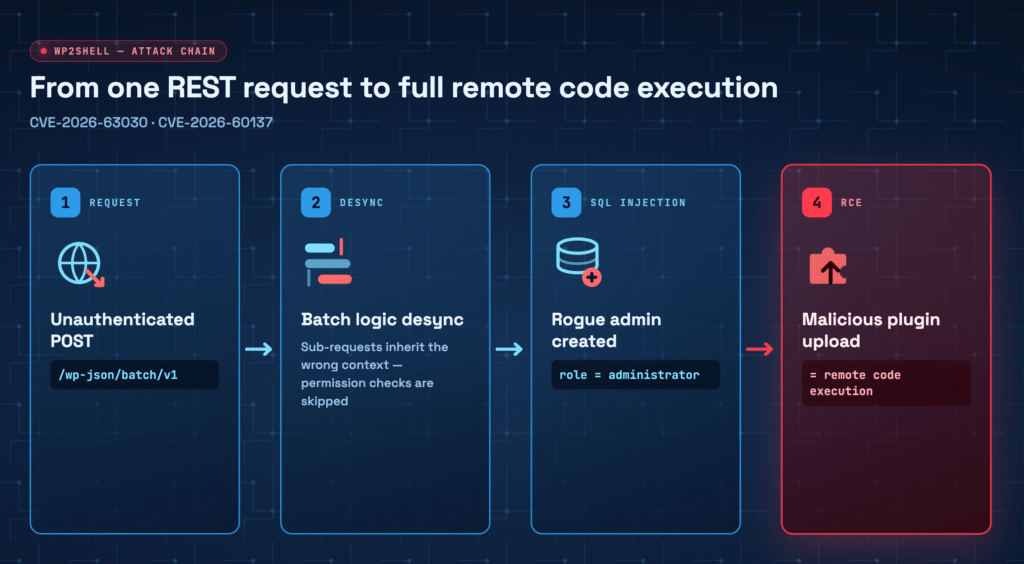
WP2Shell is a chain of two flaws, and the chain is what makes it dangerous. The entry point is a logic flaw in the WordPress REST API batch processor at /wp-json/batch/v1, where the validation loop and the execution loop fall out of step. That desync opens a second flaw, an SQL injection (tracked as CVE-2026-60137), which an attacker uses to create an administrator account and then upload a malicious plugin. A plugin runs code, so an admin account plus a plugin upload equals full remote code execution. None of it requires a password.
The reach is the reason this is front-page security news. The remote code execution affects WordPress 6.9 through 6.9.4 and 7.0 through 7.0.1, and the SQL injection half of the chain reaches back to 6.8. Public exploit code is already out, so this is not a theoretical risk you have time to think about. Attackers who land are creating backdoor administrator accounts, installing web shells, harvesting admin usernames and emails, and pulling database credentials through local file inclusion.
Patch Immediately. This Is Step One
Nothing below replaces this step. Update WordPress core to the fixed release for your branch:
- On the 6.9 branch, update to 6.9.5.
- On the 7.0 branch, update to 7.0.2.
- If you run automatic background updates, confirm the update actually applied. Open your dashboard and check the version number rather than assuming. A queued update that never ran leaves you exposed.
If you manage more than one site, treat every one of them as affected until you have checked its version by hand. This vulnerability is in core, not in a single plugin, so a site does not need anything unusual installed to be at risk.
If You Cannot Patch This Minute, Reduce Your Exposure
Some teams cannot push a core update instantly, whether because of a staging and release process, a compatibility check, or a managed host on its own schedule. That gap is exactly when mass scanning finds you. Use the time to make your site a harder, quieter target. These are exposure-reduction steps, not a fix, and they matter most in the window before the patch lands.
- Block or move the vulnerable endpoint. The attack hits
/wp-json/batch/v1. Blocking that endpoint at a firewall, or moving your REST API off its default path, takes you out of the automated scans that assume the standard location. In Hide My WP Ghost you can change the REST API path from Change Paths, part of how you customize all your WordPress paths. - Put the firewall in front of it. The built-in firewall filters malformed and hostile requests before they reach WordPress, which blunts the automated probing that drives this campaign. Turn it on alongside the other security tweaks that harden your site.
- Limit anonymous REST API access. The published mitigation advice is to stop unauthenticated calls to the REST API where you can. Restricting anonymous access shrinks the surface the exploit chain reaches through.
- Lock the front door too. While attackers are creating rogue admin accounts, tighten login: change your wp-admin URL and turn on brute force protection so a stolen or created account is harder to walk in with.
Be clear-eyed about what this buys you. Hardening reduces the odds that an automated scan reaches a working exploit against your site, and it slows a manual attacker down. It does not close the vulnerability. The moment you can apply 6.9.5 or 7.0.2, do it.
Check Whether You Are Already Compromised
If your site ran an affected version while exposed to the internet, patching now does not undo an intrusion that already happened. Look for the specific traces this campaign leaves:
- Unfamiliar administrator accounts. The exploit creates admin users. Review your user list and remove any account you cannot personally account for. An activity log that records new admin users makes this far faster than scanning the list by eye.
- Plugins you did not install. Attackers upload a malicious plugin to run their code. Check your plugin list for anything unexpected, especially recently added items with vague names.
- Odd requests to the batch endpoint. Review your HTTP access logs for anomalous requests to
/wp-json/batch/v1. A cluster of them around the disclosure window is a strong signal you were probed or hit. - Run a full scan. Use a website security check to surface changed files, injected code, and other signs of a takeover you might miss manually.
If you find any of these, treat the site as compromised: take it offline or into maintenance, rotate every credential including database and hosting, remove the rogue accounts and plugins, and restore from a known-clean backup taken before the disclosure date rather than trusting a cleanup in place.
Why Hiding Your Endpoints Helps Against Mass Exploitation
Campaigns like this one run at internet scale because they are automated. A script walks a huge list of sites, requests the default WordPress paths, and fires the exploit wherever the standard endpoint answers. That model depends on your site looking exactly like every other WordPress install. When your REST API sits somewhere other than the default path, when your firewall drops the malformed batch request, and when your login is not at the address every bot tries first, the cheap automated pass slides past you. It does not make you invulnerable, and it never replaces patching, but it moves you out of the low-effort target set that these waves feed on. That is the same reason it is worth reducing your general footprint and learning to hide WordPress from CMS and theme detectors, so a scan cannot cheaply confirm what you run in the first place.
Conclusion
WP2Shell is the kind of vulnerability that rewards speed. The exploit is public, the scanning is automated, and the payload is full site takeover with no login required. Do the three things in order. Update to 6.9.5 or 7.0.2 today, because nothing else substitutes for the patch. Reduce your exposure while you patch by moving and firewalling the REST API endpoint and tightening login. Then check for backdoor admin accounts, unknown plugins, and suspicious batch-endpoint requests, because a patch does not evict an attacker who arrived first. For the wider playbook beyond this one vulnerability, read how to stop WordPress attacks before they start, and you can see all WP Ghost features that support the hardening and monitoring steps above.
Frequently Asked Questions
Does a hardening or hiding plugin protect me from WP2Shell without updating WordPress?
No. The only thing that closes CVE-2026-63030 is the core update to 6.9.5 or 7.0.2. Hardening reduces the chance that an automated scan reaches a working exploit and slows a manual attacker down, which is useful in the short window before you patch, but it is exposure reduction, not a fix. Update core as your first action.
I already updated. Am I safe now?
The update stops new exploitation of this flaw. It does not remove an attacker who got in before you patched. If your site ran an affected version while exposed, check for rogue administrator accounts, plugins you did not install, and unusual requests to /wp-json/batch/v1 in your logs, and treat anything you find as a compromise that needs cleanup and credential rotation.
How do I know if my site was already hit?
Look for administrator accounts you cannot account for, unfamiliar plugins added around the disclosure window, and clusters of requests to the REST API batch endpoint in your access logs. An activity log and a full security scan make these signs much easier to catch than manual review alone.
Can I just block the REST API instead of updating?
Blocking or moving the /wp-json/batch/v1 endpoint, or restricting anonymous REST API access, is a reasonable temporary measure while you prepare the update. It is not a permanent substitute. The vulnerability stays present in your core files until you apply 6.9.5 or 7.0.2, so patch as soon as you can.
Which WordPress versions are affected?
The remote code execution affects WordPress 6.9 through 6.9.4 and 7.0 through 7.0.1. The SQL injection that the chain relies on reaches back to 6.8. The fixes are in 6.9.5 and 7.0.2. If you are on any affected version and reachable from the internet, treat your site as a live target until it is updated.