
WP Ghost Security Check Report – Every Issue Explained with Fixes
September 13, 2018
This tutorial has moved to the new WP Ghost Knowledge Base where each feature is presented in detail.
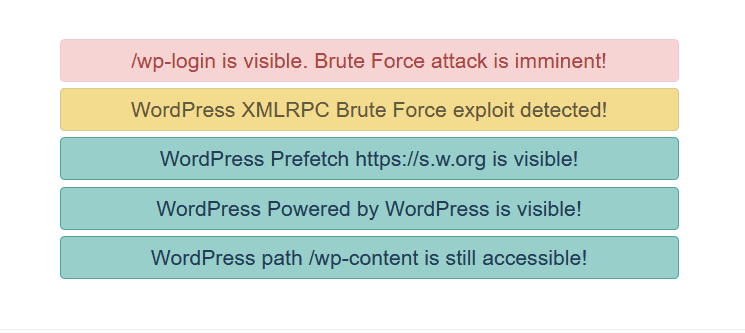
- Login Path Visible – Brute Force Attack Risk
- XML-RPC Exploit Detected
- WordPress Common Paths Accessible
- WordPress readme.html Accessible
- Old WordPress Paths Visible in Source Code
- DNS Prefetch to s.w.org Visible
- REST API Link (api.w.org) Visible
- “Powered by WordPress” Text Visible
- Run the Full Security Check
- Frequently Asked Questions
- Related Tutorials
This page explains each security issue that WP Ghost’s (formerly Hide My WP Ghost) Security Check can detect, what it means, and how to fix it. Run the Security Check from WP Ghost > Security Check > Start Scan to get your full report.
Login Path Visible – Brute Force Attack Risk

The default wp-login.php or wp-admin path is accessible to visitors. Bots use these paths to attempt brute force login attacks.
Fix: Change the login path in WP Ghost > Change Paths > Login Security. Enable brute force protection in WP Ghost > Brute Force. See the Change Login Path and Brute Force Protection tutorials.
XML-RPC Exploit Detected

The xmlrpc.php file is accessible. XML-RPC is a legacy API commonly targeted for brute force attacks and DDoS amplification via system.multicall.
Fix: Disable XML-RPC in WP Ghost > Change Paths > API Security. If needed for Zapier or automation, use the firewall whitelist instead. See the Disable XML-RPC tutorial.
WordPress Common Paths Accessible

The /wp-content/plugins/ and /wp-content/themes/ directories are directly accessible. Bots probe these to enumerate plugins and check for known vulnerabilities.
Fix: Change paths in WP Ghost > Change Paths > WP Core Security and enable Hide WordPress Common Paths. See the Change wp-content Path and Change Plugins Path tutorials.
WordPress readme.html Accessible
Files like readme.html, license.txt, and wp-config-sample.php reveal your WordPress version and confirm your CMS.
Fix: Enable Hide WordPress Common Files in WP Ghost > Change Paths > WP Core Security.
Old WordPress Paths Visible in Source Code

The page source still contains /wp-content/, /wp-includes/, or /wp-admin/ references. Path changes are not fully applied or cached pages contain old URLs.
Fix: Clear all caches. Enable Change Paths in Cached Files in WP Ghost > Tweaks. View source in a private browser and search for “wp-content” to verify.
DNS Prefetch to s.w.org Visible

WordPress adds a DNS prefetch link to s.w.org for emojis. This confirms WordPress to scanners.
Fix: Enable Hide WordPress Version in WP Ghost > Tweaks > Hide Options.
REST API Link (api.w.org) Visible

The api.w.org link in HTML head confirms WordPress and exposes the REST API endpoint.
Fix: Hide the REST API link in WP Ghost > Change Paths > API Security. See the Change REST API Path tutorial.
“Powered by WordPress” Text Visible

The footer contains “Powered by WordPress” text – the most obvious CMS fingerprint.
Fix: Remove from your theme options (most themes have a footer credit setting). Also change the default tagline “Just another WordPress site” in Settings > General > Tagline.
Run the Full Security Check
Go to WP Ghost > Security Check > Start Scan. The scanner checks 39 security tasks and flags each as passed or needs attention. Click Fix It on flagged items to resolve automatically. To fix most issues at once, activate Safe Mode or Ghost Mode.
Frequently Asked Questions
How do I fix all issues at once?
Select Safe Mode or Ghost Mode. This addresses the majority of items. Enable brute force protection and security headers separately. Run Security Check again to verify.
What score should I aim for?
90/100 or higher means well protected. 95+ is excellent. Not every check needs to be perfect – some are optional depending on your site’s needs.
Does WP Ghost modify WordPress core files?
No. All fixes use URL rewrite rules, WordPress filters, and PHP hooks. Deactivating restores all defaults.
Related Tutorials
Website Security Check – how to run and interpret the full scan.
Customize All WordPress Paths – fix path-related issues in one guide.
Brute Force Protection – add reCAPTCHA and login limits.
Activate Security Tweaks – hide version tags, META IDs, and fingerprints.
Hide from Theme Detectors – the complete CMS hiding checklist.