WP Ghost vs Wordfence vs Sucuri vs Solid Security
April 18, 2026
Last updated: April 2026
- Why This Comparison Exists
- What Each Plugin Actually Does
- Full Feature Comparison (25 Categories)
- Where Each Plugin Wins
- Recommended Plugin Stacks for 2026
- Pricing Comparison (2026)
- Performance Impact
- Frequently Asked Questions
- Can I run WP Ghost and Wordfence together?
- Can I run WP Ghost and Sucuri together?
- Can I run WP Ghost and Solid Security together?
- Does WP Ghost replace Wordfence?
- Which plugin has the best free version?
- Which plugin is best for WooCommerce?
- Will running two security plugins slow my site?
- Does WP Ghost modify WordPress core files?
- Related Tutorials
WP Ghost, Wordfence, Sucuri, and Solid Security solve different problems. WP Ghost prevents attacks by hiding WordPress from scanners and filtering traffic at the server edge. Wordfence detects and blocks attacks with an endpoint firewall and malware scanner. Sucuri filters traffic through a cloud WAF before it reaches your server. Solid Security hardens WordPress configuration and enforces user security policies. Most sites benefit from running two of these together rather than picking one and hoping it covers everything. This guide compares all four across 25 feature categories so you can match the right tools to your actual threat profile.
Why This Comparison Exists
The question “which WordPress security plugin should I use?” gets asked constantly, and the answer is almost never a single plugin. WordPress security works in layers, and each of these four plugins is strongest at a different layer. The real question is: which combination covers your needs without creating conflicts or redundant overhead?
This comparison is written by WP Ghost, so you should expect our perspective. What we’ve tried to do is be genuinely fair. We’ll tell you where Wordfence, Sucuri, and Solid Security are better than WP Ghost, because they are in specific areas, and where WP Ghost fills gaps the others don’t. If you end up choosing a different plugin after reading this, you’ll at least make that choice with accurate information.
What Each Plugin Actually Does
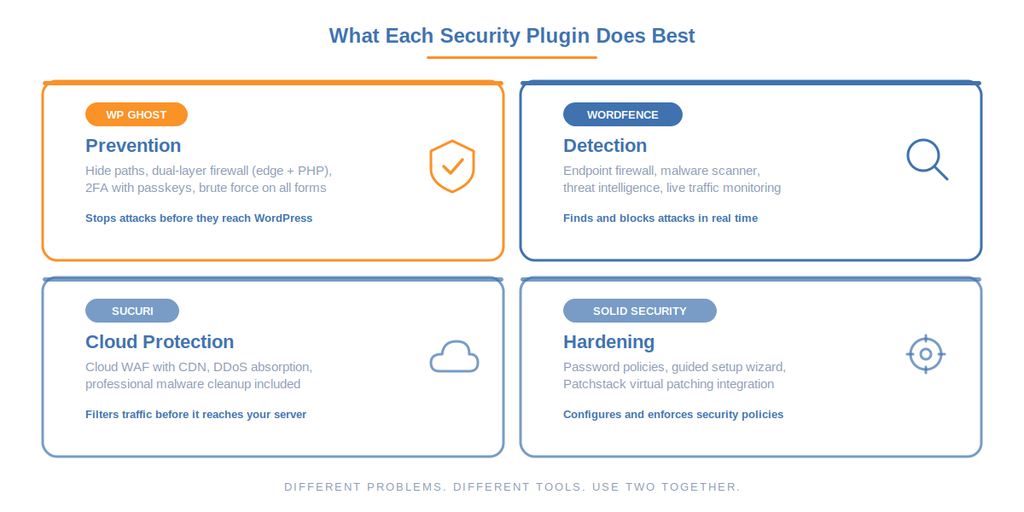
Before the comparison table, here’s the honest one-line positioning for each plugin. If you remember nothing else, remember these four sentences.
WP Ghost prevents attacks by reducing your attack surface. It hides WordPress paths, filters malicious traffic at both the rewrite layer and the application layer, and hardens authentication with 2FA and passkeys. It does not scan for or remove malware.
Wordfence detects and blocks attacks with an endpoint firewall that runs inside WordPress and a malware scanner that checks files against known signatures. It has the largest threat intelligence network in the WordPress ecosystem.
Sucuri filters traffic through a cloud-based WAF before it reaches your server. It includes professional malware cleanup as part of the paid plan. The free plugin is limited to auditing and basic scanning.
Solid Security (formerly iThemes Security) hardens WordPress configuration, enforces password policies, and provides a guided setup experience. Its Patchstack integration offers virtual patching for vulnerable plugins.
Full Feature Comparison (25 Categories)
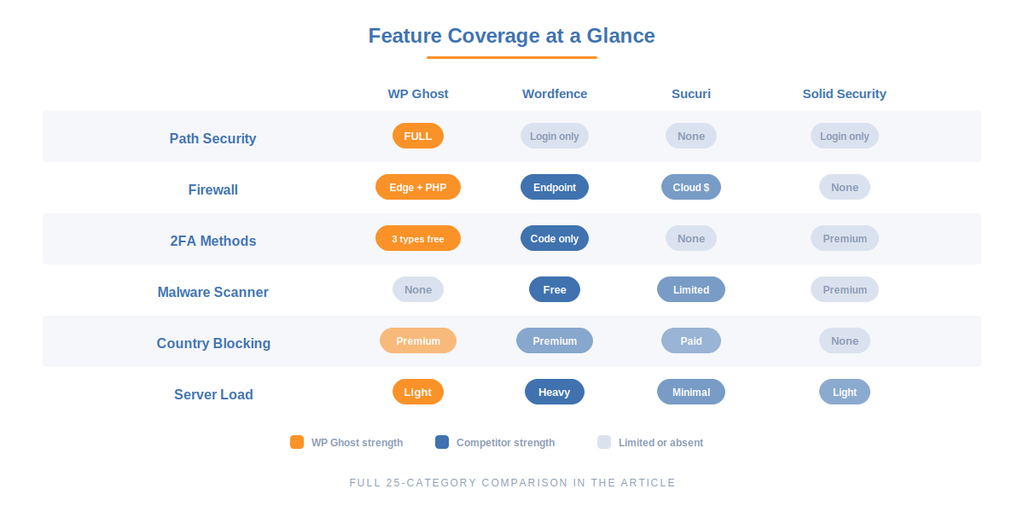
This table covers every major security feature across all four plugins. “Free” means included in the free version. “Premium” means paid tier only. A dash means the plugin doesn’t offer that feature.
| Feature | WP Ghost | Wordfence | Sucuri | Solid Security |
|---|---|---|---|---|
| Attack Surface Reduction | ||||
| Change wp-login.php path | Free | Free | – | Free |
| Change wp-admin path | Free | – | – | – |
| Change wp-content, wp-includes, uploads paths | Free | – | – | – |
| Hide plugin and theme directory names | Free | – | – | – |
| Change REST API path | Free | – | – | – |
| Strip WordPress version, meta, RSD headers | Free | – | Free | Free |
| Hide common files (readme, license, wp-config) | Free | – | – | – |
| Text, URL, and CDN mapping | Free | – | – | – |
| Firewall | ||||
| 7G / 8G server-edge firewall | Free | – | – | – |
| Application-level firewall (PHP / WordPress context) | Free | Free | Paid | – |
| Cloud WAF (traffic filtered before reaching server) | – | – | Paid | – |
| SQL injection protection | Free | Free | Paid | – |
| XSS protection | Free | Free | Paid | – |
| Security headers (HSTS, CSP, X-Frame-Options) | Free | – | – | – |
| Block theme detector bots | Free | – | – | – |
| Block AI crawlers (GPTBot, ClaudeBot, etc.) | Premium | – | – | – |
| Authentication & Login Security | ||||
| 2FA by code (TOTP / authenticator app) | Free | Free | – | Premium |
| 2FA by email | Free | – | – | – |
| 2FA by passkey (Face ID, Touch ID, Windows Hello) | Free | – | – | Premium |
| Magic Link Login (passwordless) | Free | – | – | Free |
| Temporary Logins (time-limited accounts) | Free | – | – | – |
| Brute force protection on login | Free | Free | – | Free |
| Brute force protection on register, lost password, comments | Free | – | – | – |
| reCAPTCHA (Math, V2, V3) | Free | Free | – | Free |
| Password policies and expiration | – | – | – | Free |
| Scanning & Detection | ||||
| Malware scanner | – | Free | Free (limited) | Premium |
| File change detection | – | Free | Free | Free |
| Threat intelligence / signature database | – | Free (delayed) / Premium (real-time) | Paid | Via Patchstack |
| Virtual patching for vulnerable plugins | – | – | Paid | Via Patchstack |
| Professional malware cleanup service | – | Premium | Paid (included in plans) | – |
| Geo Security & IP Management | ||||
| Country blocking | Premium | Premium | Paid | – |
| IP blacklist / whitelist | Free | Free | Free | Free |
| IP Block Automation (auto-block repeat offenders) | Premium | Free | Paid | Free |
| Monitoring & Logging | ||||
| Security threats log | Free (limited) / Premium (full) | Free | Free | Free |
| User events log (logins, role changes, settings) | Free (limited) / Premium (full) | – | Free | Free |
| Live traffic monitoring | – | Free | – | – |
| GEO threat map | Free | – | – | – |
| CSV export for compliance | Premium | – | – | – |
| Hardening & Configuration | ||||
| Disable XML-RPC | Free | Free | – | Free |
| Disable REST API for non-authenticated users | Free | – | – | Free |
| Disable right-click, inspect element, view source | Free | – | – | – |
| Database prefix change | Premium | – | – | Free |
| SALT key regeneration | Premium | – | – | – |
| File and folder permission fix | Premium | – | – | Free |
| Security presets (one-click configuration) | Free | – | – | Free (guided wizard) |
| Performance & Compatibility | ||||
| Server resource usage | Light (rewrite rules + PHP firewall) | Heavy (PHP firewall + scanner) | Minimal (cloud-side filtering) | Light |
| WooCommerce compatible | Yes | Yes | Yes | Yes |
| Works with caching plugins | Yes | Yes | Yes | Yes |
| Login page designer | Free | – | – | – |
Where Each Plugin Wins
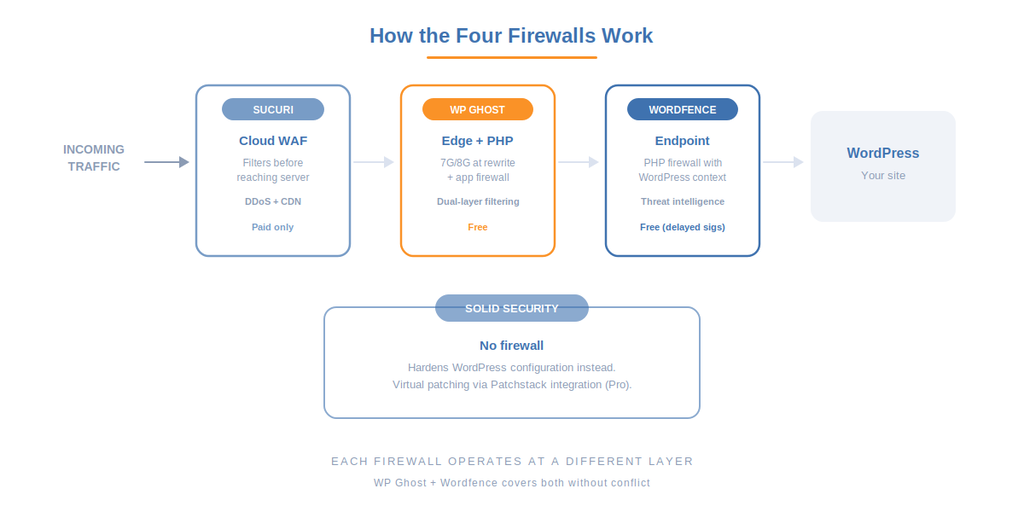
Being fair about strengths matters more than claiming to be best at everything. Here’s where each plugin is genuinely the strongest choice.
WP Ghost Wins At: Prevention and Attack Surface Reduction
No other plugin in this comparison changes wp-admin, wp-content, wp-includes, uploads, plugin names, theme names, REST API paths, and admin-ajax.php. Wordfence changes the login URL. Solid Security changes the login URL. Sucuri doesn’t change any paths. WP Ghost changes all of them, plus strips every metadata fingerprint that scanners use to identify WordPress.
WP Ghost is also the only plugin that includes both a 7G/8G firewall running at the server edge (rewrite layer) and an application-level firewall with PHP context, both free. The rewrite-layer rules block malicious requests before PHP loads, while the application-level firewall inspects requests with WordPress context for deeper pattern matching. This dual-layer approach catches attacks at two different points in the request chain. The 2FA offering is the broadest: code, email, and passkeys (Face ID, Touch ID, Windows Hello, hardware keys) are all free. Wordfence only offers code-based 2FA. Solid Security requires Premium for 2FA. Sucuri doesn’t include 2FA at all.
WP Ghost also uniquely includes theme detector blocking, text and URL mapping, CDN mapping, a login page designer, and temporary logins, all in the free version.
Wordfence Wins At: Detection and Threat Intelligence
Wordfence has the most comprehensive free security plugin on the market. Its endpoint firewall runs inside WordPress with full context awareness (user identity, login state, request payload), which lets it make decisions no rewrite-layer firewall can. The malware scanner checks files against a constantly updated signature database. Live traffic monitoring shows every request hitting your site in real time. The threat intelligence network spans millions of sites, which means new attack patterns are identified and blocked quickly across the entire network.
If you need to know what’s happening on your site right now and you want a scanner that finds infections, Wordfence is the standard.
The trade-off: Wordfence runs on your server, which means it uses CPU and memory on every request. On shared hosting with limited resources, this can noticeably slow your site. The free version also receives threat intelligence updates 30 days after Premium users, which creates a protection gap during critical vulnerability windows.
Sucuri Wins At: Cloud-Level Protection and Incident Response
Sucuri’s cloud WAF is in a different category from plugin-level firewalls. Traffic routes through Sucuri’s global network before it reaches your server, which means DDoS attacks, brute force floods, and exploit attempts are absorbed at the edge with zero load on your hosting. The WAF includes a built-in CDN for performance. The paid plans include professional malware cleanup, guaranteed response times, and active monitoring by Sucuri’s security team.
If you run a high-traffic business site, need hands-off incident response, or want someone else to handle security incidents when they happen, Sucuri is the pick.
The trade-offs: the free plugin is limited to auditing and basic scanning, the WAF requires a separate paid subscription starting at $229/year, and the DNS-level setup can be tricky for non-technical users. The free version is not competitive with the free tiers of WP Ghost or Wordfence.
Solid Security Wins At: Configuration Hardening and User Policy
Solid Security (formerly iThemes Security) has the best guided onboarding of any WordPress security plugin. The setup wizard configures security in under 10 minutes without requiring expertise. Password policies with expiration, strong password enforcement, and user-level security controls are areas none of the other three plugins handle as well. The Patchstack integration is a genuine differentiator: it monitors your installed plugins for known vulnerabilities and can apply virtual patches automatically before the developer ships a fix.
If you manage client sites and need to enforce security policies across non-technical users, or if you want virtual patching to cover the 5-hour exploit window, Solid Security fills a gap the others don’t.
The trade-offs: no built-in WAF (neither application-level nor cloud), limited path security (login URL only), and 2FA requires the Premium tier. The free version is thinner than WP Ghost’s or Wordfence’s free offerings.
Recommended Plugin Stacks for 2026
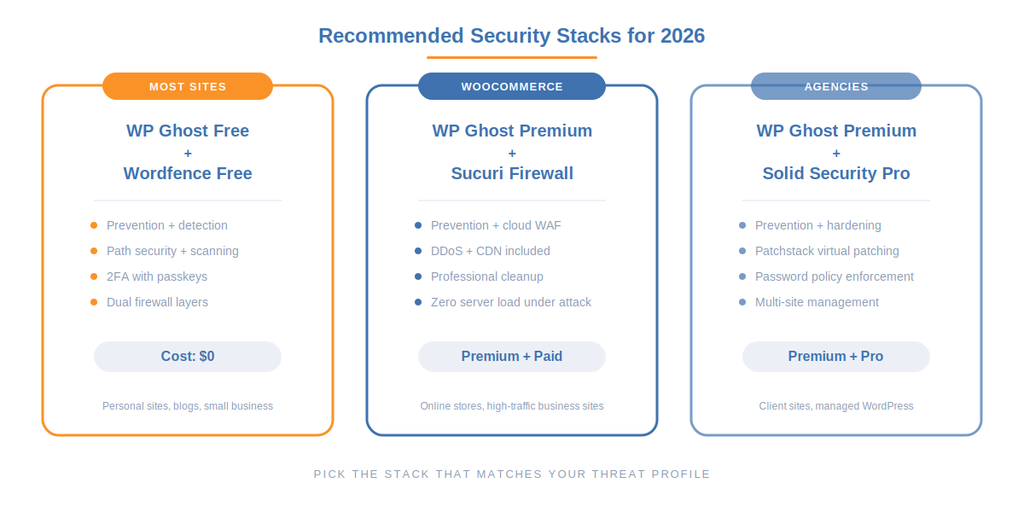
Rather than picking one plugin and hoping it covers everything, here are the stacks that work best for different site types. Each stack covers all three security layers: prevention, detection, and response.
Best for Most WordPress Sites
WP Ghost (free) + Wordfence (free)
WP Ghost handles prevention: hides all paths, runs the 7G/8G firewall at the edge, provides 2FA with passkeys, and blocks brute force across all forms. Wordfence handles detection: endpoint firewall with context awareness, malware scanning, and live traffic monitoring. Together they cover prevention, detection, and scanning with zero cost. Configuration guide at WP Ghost with Wordfence.
Best for WooCommerce and High-Traffic Business Sites
WP Ghost (Premium) + Sucuri (Firewall plan)
WP Ghost Premium handles prevention with full path security, IP Block Automation, Country Blocking, and Security Threats Log. Sucuri handles cloud-level protection (DDoS absorption, WAF, CDN) and incident response with guaranteed cleanup. This stack moves both the prevention and the heavy traffic filtering off your server. Configuration guide at WP Ghost with Sucuri.
Best for Agencies Managing Client Sites
WP Ghost (Premium) + Solid Security (Pro)
WP Ghost Premium handles prevention and logging. Solid Security Pro handles password policies, guided hardening, and virtual patching through Patchstack. This stack is strongest for client-managed sites where non-technical users need enforced security policies. Configuration guide at WP Ghost with Solid Security.
Budget Stack (Zero Cost)
WP Ghost (free) + Wordfence (free)
Same as the “most sites” recommendation. WP Ghost’s free version includes 115+ features, covering path security, 7G/8G firewall, all three 2FA methods, brute-force protection, and security headers. Wordfence’s free version includes the endpoint firewall (with delayed signatures) and malware scanner. This covers about 90% of what most personal and small business sites need.
Pricing Comparison (2026)
| Plugin | Free Version | Premium Starting Price | What Premium Adds |
|---|---|---|---|
| WP Ghost | 115+ features | $29.99/year per site | IP Block Automation, Country Blocking, full logs with search/filter/export, Ghost Mode, extended file extension hiding, SALT regeneration, DB prefix change, priority support |
| Wordfence | Firewall (delayed sigs) + scanner | $149/year per site | Real-time signatures, country blocking, IP reputation blocklist, priority support, Wordfence Central for multi-site |
| Sucuri | Audit log + basic scanner | $229/year (Firewall), $299/year (Platform) | Cloud WAF with CDN, malware cleanup, DDoS protection, advanced scanning, site monitoring |
| Solid Security | Hardening + login security | $99/year per site | Patchstack virtual patching, malware scanning, 2FA, passkeys, version management, password policies with expiration |
Note: prices change. Check each plugin’s site for current pricing. The comparison above reflects publicly listed prices as of April 2026.
Performance Impact
This matters more than most comparison articles acknowledge. Security plugins that slow your site down create a different kind of problem.
WP Ghost: light. Path security uses server-level rewrite rules that execute before PHP loads. The 7G/8G firewall runs at both the rewrite layer and the application layer with PHP context, providing dual-point filtering. Lighter than Wordfence because WP Ghost doesn’t include a malware scanner or live traffic monitoring, which are the heaviest server-side operations.
Wordfence: noticeable on shared hosting. The endpoint firewall inspects every request at the PHP level, and the malware scanner uses server CPU during scans. On managed hosting with adequate resources, the impact is manageable. On budget shared hosting, it can visibly slow page loads. Disabling Live Traffic and scheduling scans for off-peak hours helps.
Sucuri: minimal (paid WAF), negligible (free plugin). The cloud WAF filters traffic before it reaches your server, so server load actually decreases under attack. The free plugin only runs audit logging and basic checks.
Solid Security: light. Most features are configuration-based (hardening settings, password policies) with no per-request overhead. File change detection runs on a schedule.
Frequently Asked Questions
Can I run WP Ghost and Wordfence together?
Yes. They are fully compatible and complement each other. WP Ghost handles path security, its own application-level firewall, and the 7G/8G edge filtering. Wordfence handles its endpoint firewall with threat intelligence and malware scanning. The two firewalls catch different attack patterns and don’t conflict. Use WP Ghost for path security, 2FA (passkey support), and brute force on all forms. Use Wordfence for its malware scanner and threat intelligence database. Configuration details at WP Ghost with Wordfence.
Can I run WP Ghost and Sucuri together?
Yes. WP Ghost handles the application layer (path security, 7G/8G firewall, authentication). Sucuri handles the network layer (cloud WAF, DDoS absorption, CDN). They don’t overlap. Sucuri’s file integrity monitoring won’t flag WP Ghost as a core modification because WP Ghost doesn’t modify core files. Configuration at WP Ghost with Sucuri.
Can I run WP Ghost and Solid Security together?
Yes, with some configuration. Both plugins offer a custom login URL, brute force protection, and IP blocking. Enable each feature in only one plugin to avoid conflicts. Use WP Ghost for path security (it covers far more paths than Solid Security) and 2FA (passkey support is free in WP Ghost, Premium in Solid Security). Use Solid Security for password policies, database prefix changes, and Patchstack virtual patching. Configuration at WP Ghost with Solid Security.
Does WP Ghost replace Wordfence?
No. WP Ghost is a hack prevention plugin. Wordfence is a detection and response plugin. WP Ghost doesn’t scan for malware. Wordfence doesn’t hide WordPress paths. They solve different problems and work best together. If budget forces a single choice, WP Ghost comes first because prevention stops most attacks from landing, but adding Wordfence’s scanner gives you the detection layer that catches what gets through.
Which plugin has the best free version?
WP Ghost and Wordfence both have strong free versions, but they cover different areas. WP Ghost free includes 115+ features covering path security, 7G/8G firewall, all three 2FA methods (including passkeys), brute force protection across all forms, security headers, and temporary logins. Wordfence free includes an endpoint firewall (with delayed signatures), malware scanner, 2FA (code only), brute force protection on login, and live traffic monitoring. Together they cover prevention + detection at zero cost.
Which plugin is best for WooCommerce?
All four are compatible with WooCommerce. WP Ghost is specifically tested with WooCommerce checkout, cart, and customer account flows. Wordfence and Sucuri both protect WooCommerce without issues. For WooCommerce stores specifically, the recommended stack is WP Ghost (prevention + hidden login + 2FA) plus either Wordfence (scanning) or Sucuri (cloud WAF for high-traffic stores).
Will running two security plugins slow my site?
It depends on which two. WP Ghost + Wordfence works well because WP Ghost’s firewall is lighter than Wordfence’s (no malware scanner, no live traffic feature), and the two firewalls catch different patterns at different layers. The combined overhead is lower than running two full-weight security plugins. WP Ghost + Sucuri is even lighter because Sucuri’s WAF runs in the cloud. Avoid running Wordfence + Sucuri together: both have PHP-level firewalls that inspect the same requests, which creates redundant overhead and potential conflicts.
Does WP Ghost modify WordPress core files?
No. WP Ghost never touches WordPress core files. It uses rewrite rules, filters, and a mapping engine to redirect requests and hide the real paths. Core, plugins, and themes stay untouched, which means updates apply normally and nothing breaks when you deactivate the plugin.
Related Tutorials
- WordPress Hack Prevention: The Complete 2026 Guide
- WordPress Security Statistics 2025-2026
- WP Ghost with Wordfence compatibility setup
- WP Ghost with Sucuri compatibility setup
- WP Ghost with Solid Security compatibility setup
- Full compatibility plugins list (50+)
- Two-Factor Authentication (Code, Email, Passkeys)
- Firewall and Geo Security
- WP Ghost settings best practice