WordPress CSRF Protection: How Nonces, SameSite, and Referer Checks Stop Forged Requests
September 16, 2026
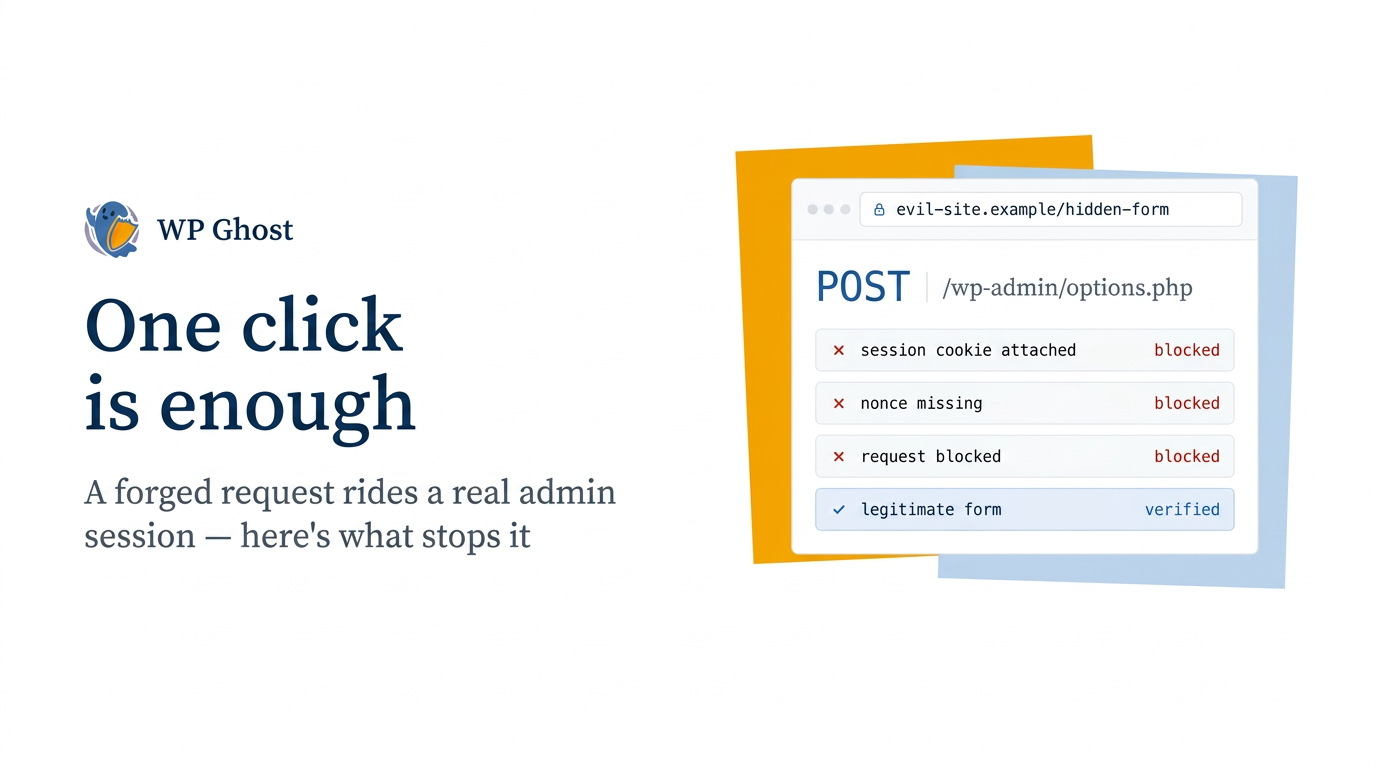
Imagine one of your admins clicks a link in what seems like a routine email. They’re logged into your WordPress dashboard in another tab, as usual. Unbeknownst to them, the page they visit quietly sends a request back to your site in the background, using their active session. Your site responds as if the admin made the request: changing a setting, creating a user, updating an option. No one stole a password—the browser simply handed over a valid, logged-in session, and the request piggybacked on it.
That’s cross-site request forgery (CSRF), and the disturbing truth is that any logged-in admin can trigger it by accident. You can’t prevent every mistaken click—but you can make sure your site rejects forged requests, even when they come from a real admin’s browser. This guide breaks down how CSRF works in WordPress and the three key defenses that stop it.
What CSRF actually exploits
CSRF takes advantage of trust, not stolen credentials. Your browser automatically attaches your WordPress session cookie to every request it sends to your site, regardless of what page made the request. The attacker doesn’t need your cookie—they just need your browser to send a request while you’re logged in.
The attack works like this:
- You are logged into your WordPress admin.
- In another tab, you open a page the attacker controls, from a link, an ad, or a compromised site.
- That page sends a hidden request to your site: a form submission, an image request, a script call.
- Your browser attaches your session cookie, so your site treats the forged request as if it’s coming from you—and acts on it.
That’s why CSRF appears in the OWASP Top 10 under Broken Access Control (A01) and is catalogued as CWE-352. It’s not a rare or exotic issue. Forged-request flaws keep surfacing in WordPress plugins—even in those handling sensitive actions such as two-factor setup—where a single forged request can cause serious harm.
The three controls that stop a forged request
A forged request can look almost identical to a real one. The key is to add something the attacker’s page can’t provide. There are three layers of defense, and they work best together.
Nonces: the token an attacker can’t guess
WordPress nonces are your main line of defense—and the one you control most directly. A nonce is a short-lived token tied to a specific action and user. WordPress adds it to legitimate forms and links, and the server checks it with wp_verify_nonce() or check_admin_referer() before doing anything important. An attacker’s page might be able to mimic a request, but it can’t create a valid, current nonce for your session. The check fails, and the action is blocked.
The catch: nonces only protect actions that actually check them. WordPress core covers its own actions, but custom code and plugins need to add the check themselves. Most CSRF flaws you hear about come from a handler that forgot to call wp_verify_nonce(). If you write or maintain custom endpoints, make sure you verify the nonce on every state-changing request—this is the single most important habit.
SameSite cookies: stop the cookie from riding along
The second layer is at the cookie level. The SameSite attribute tells your browser when to attach your session cookie to requests from other sites. Set it to Lax or Strict, and the browser stops sending your WordPress session cookie on cross-site POST requests—the main vector CSRF relies on. You set this once, and it blocks a whole class of forged requests before your code ever runs.
Referer checking: verify where the request came from
The third layer checks where the request is coming from. check_admin_referer() confirms that a request came from your own site—not a foreign page. This isn’t enough by itself, since referer headers can be stripped, but when combined with nonces and SameSite cookies, it’s one more hurdle for an attacker. Defense in depth means a forged request would have to overcome all three—and that’s nearly impossible.
How to harden your WordPress site against CSRF
Here’s the practical order of steps. If you’re working on a live site, start with the SameSite cookie change and a nonce audit of your custom code—these two close the biggest gaps the fastest.
- Set SameSite on your cookies. Configure your session and authentication cookies to at least SameSite=Lax. This is managed in your site’s security headers, where cookie and header policy meet.
- Add the rest of your security headers. A complete set backs up your data policy with browser-enforced rules. (See our guide to implementing website security headers.)
- Add a content security policy. This limits what a compromised or injected page can do, reducing the potential damage if an attacker gets a foothold.
- Audit nonces in your custom code. Every handler that changes state should call wp_verify_nonce() or check_admin_referer(). Fix any that don’t.
- Make your admin endpoints less predictable. CSRF payloads are usually written for default WordPress paths. If you change your wp-admin URL, those canned payloads can’t find their target, which makes opportunistic attacks much harder.
A quick note on scope: Nonces and SameSite cookies are your actual CSRF defense, living in WordPress core and your own code. Security plugins play a supporting role—reducing the attack surface around login and admin areas, keeping their own code clean and nonce-verified, and logging suspicious activity. WP Ghost’s hardening features help, but no plugin can replace verifying nonces in the code that handles your requests.
What CSRF protection does and does not cover
When done right, these three controls stop forged requests cold—even if it’s a logged-in admin’s browser sending them. That’s the core reassurance: one careless click by one admin no longer means your site will execute an attacker’s command.
What these controls don’t do: fix a plugin that ships without nonce checks. If a state-changing endpoint never verifies the token, SameSite cookies help, but the underlying flaw remains until the plugin is patched. Keep your plugins up to date, choose ones that verify requests properly, and treat CSRF as both a configuration task and a code-quality issue. See our complete hack prevention guide for how this fits with other defenses.
FAQ
Does WordPress have built-in CSRF protection?
Partly. WordPress core provides the nonce system and verifies its own actions, so core requests are protected. But nonces only protect handlers that actually check them. Custom code and third-party plugins have to call wp_verify_nonce() or check_admin_referer() themselves. Most CSRF flaws trace back to a handler that skipped this step.
Will SameSite cookies break my logins or my site?
Not with SameSite=Lax, which is the recommended default. Lax lets users navigate to your site normally while blocking cross-site POST requests, so regular logins work as usual. Strict is tighter and can affect flows where users come from external links, so test it first if your site has membership or checkout journeys.
Can a firewall stop CSRF attacks?
Only partially—and you shouldn’t rely on it for CSRF. A forged request often looks just like a legitimate, authenticated one, so pattern-matching filters can miss it. The reliable defenses are nonces and SameSite cookies, which verify intent and origin, not just a signature. Treat your firewall as a complementary layer—not your main CSRF defense.
How is CSRF different from XSS?
They exploit different types of trust. CSRF tricks a victim’s browser into sending a forged—but authenticated—request to your site. XSS injects malicious script into a page so it runs in the victim’s browser. CSRF uses your session to act as you; XSS runs code as your page. Content security policy and input management address XSS; nonces and SameSite cookies protect against CSRF.