WordPress XSS Prevention: Stop Malicious Scripts From Hijacking Your Visitors

A malicious script blocked by a shield before it reaches a website visitor's browser

Imagine a visitor lands on your site, and without clicking anything, their browser silently runs code an attacker planted in your page. It steals their session, redirects them to a scam, or serves a pop-under ad network you never signed up for. You did nothing wrong that day, the script was injected weeks ago through a vulnerable plugin and has been quietly firing on every page load since. That is cross-site scripting, and it is one of the most common ways WordPress sites get turned against their own audience.

XSS (cross-site scripting) works because the browser trusts your domain. When an attacker sneaks a <script> into content your site echoes back, the browser treats it as legitimate code from you and runs it with your site’s privileges. The damage lands on your visitors, stolen logins, hijacked sessions, malicious redirects, and on you, in the form of a defaced site and a Google blocklist warning that tanks your traffic. This guide walks you through closing that gap, from the code that renders your pages to a firewall that stops injected scripts at the door.

Understand How XSS Gets Into a WordPress Site

There are three flavors, and knowing them tells you where to defend.

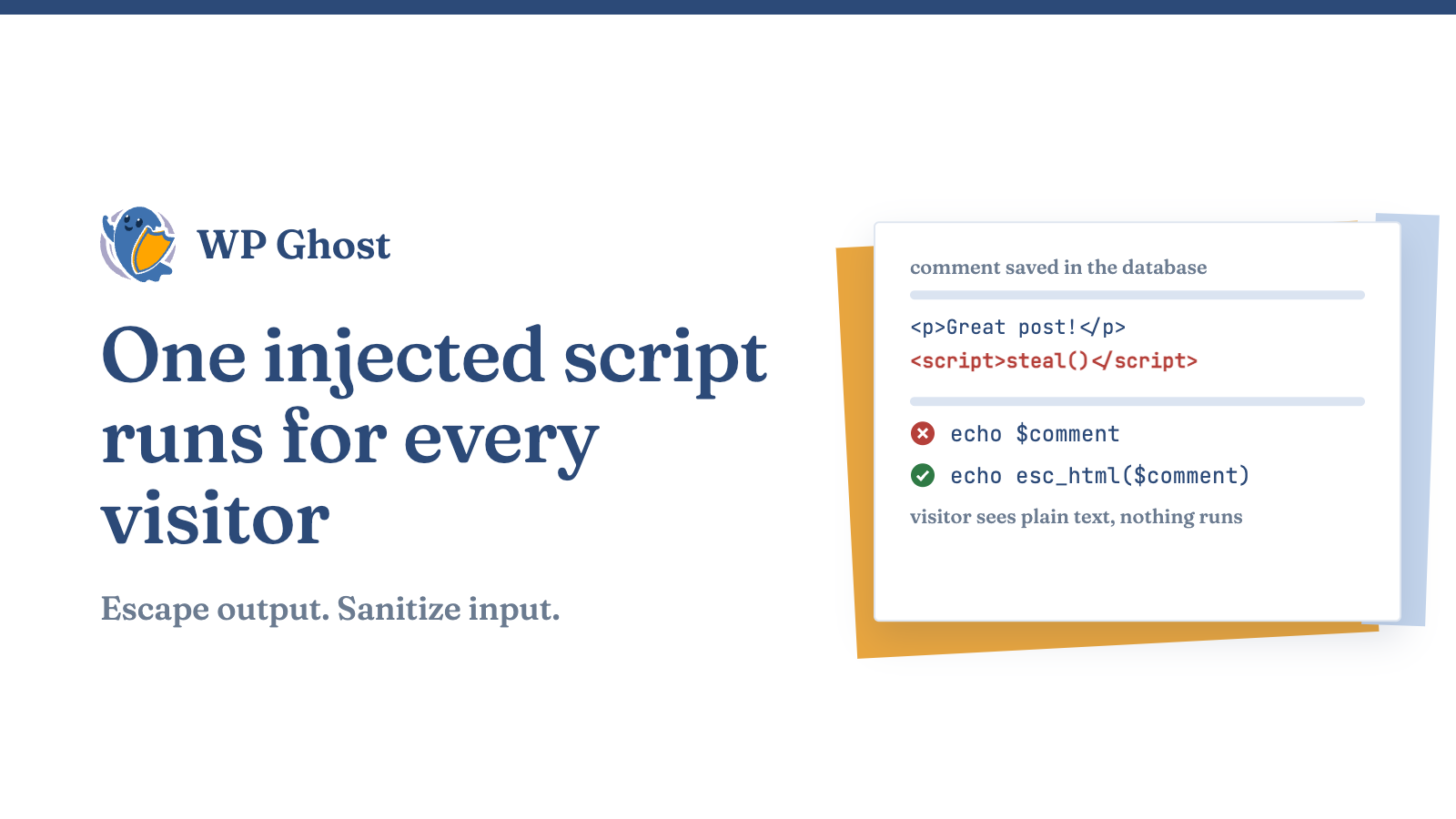
Stored XSS is the worst. The malicious script gets saved in your database, through a comment field, a form submission, a plugin setting, and runs for every visitor who loads the affected page. Recent disclosures show exactly this: stored XSS through comment content, through translation strings, through plugin fields that failed to sanitize input. One injection, thousands of victims.

Reflected XSS bounces a script off your site through a URL or form and runs it in the victim’s browser when they follow a crafted link. A high-severity WordPress core vulnerability disclosed in 2026 was a pre-authentication reflected XSS on the login screen, no credentials required , with a demonstrated path to running code on the server under the right conditions. It was fixed quickly, but it is a reminder that even core is not immune, and that the fix only protects sites that actually applied the update.

DOM-based XSS happens entirely in the browser when JavaScript writes untrusted data into the page. If your theme or a plugin drops user input straight into .innerHTML, an attacker can inject markup that executes client-side.

The defense is a chain: sanitize what comes in, escape what goes out, restrict the HTML you allow, and put a firewall in front to catch what your code misses.

Escape Every Output, This Is the Core of XSS Prevention

The golden rule of XSS prevention is: escape on output, and match the escaping to the context. Escaping converts characters like < and " into harmless equivalents so the browser displays them as text instead of executing them. WordPress gives you a purpose-built function for each context.

  • esc_html(): for text you print between HTML tags. Use this for names, titles, and any string shown as plain content.
  • esc_attr(): for values inside an HTML attribute, like value="…" or title="…".
  • esc_url(): for URLs in href and src attributes. It strips dangerous protocols like javascript:.
  • esc_js(): for data you output inside an inline script.
  • esc_textarea(): for content pre-filled into a <textarea>.

Vulnerable:

php

echo '<h2>' . $_GET['name'] . '</h2>';

Safe:

php

echo '<h2>' . esc_html( $_GET['name'] ) . '</h2>';

Escape as late as possible, right at the point of output, and escape every dynamic value, even ones you think are safe. Data you stored last year through a form you have since removed is still data an attacker may have controlled. Escaping at output is what neutralizes it now.

Handle Client-Side Rendering Carefully

If your theme or plugins build markup in JavaScript, avoid dumping untrusted data into .innerHTML or jQuery’s .html() entirely. Construct elements and set their text with .textContent instead, so the browser never parses attacker input as HTML. Server-side escaping does not cover code that runs in the browser, DOM-based XSS needs its own discipline.

Sanitize Input as It Comes In

Escaping protects output; sanitization cleans input before you store it. Together they form defense in depth: even if one layer is bypassed, the other stands.

  1. Sanitize on save with the right function. Use sanitize_text_field() for single-line text, sanitize_textarea_field() for multi-line, sanitize_email() for addresses, and esc_url_raw() for URLs you are storing.
  2. Never trust any request data. $_GET, $_POST, cookies, and REST API payloads are all attacker-controllable. Validate and sanitize every one before it touches your database.
  3. Sanitize AJAX and REST endpoints too. A repeated pattern in real vulnerabilities is a shortcode that sanitizes correctly while an unauthenticated AJAX action for the same feature skips it entirely. Every entry point needs its own sanitization, not just the obvious one.

Use wp_kses to Allow Only Safe HTML

Sometimes you genuinely need to let users submit some HTML, bold text, links, lists in a comment or profile. Do not allow raw HTML, and do not try to blocklist bad tags. Use wp_kses() with an explicit allowlist of the exact tags and attributes you permit.

php

$allowed = array(
    'a'      => array( 'href' => array(), 'title' => array() ),
    'strong' => array(),
    'em'     => array(),
);
$clean = wp_kses( $user_input, $allowed );

Anything not on the list is stripped. Be conservative, the fewer tags and attributes you allow, the smaller the attack surface. Note that wp_kses allowlists have themselves been the source of bypasses when an allowed tag or attribute lets unescaped quotes slip through, so keep your allowlist minimal and keep WordPress updated so core’s wp_kses fixes reach you.

Keep WordPress, Plugins, and Themes Patched

Almost every XSS attack that actually succeeds rides a known, already-patched vulnerability. Attackers scan for outdated versions and fire the matching exploit automatically. The core login XSS, the stored XSS in a popular caching plugin’s comment handling, the translation-plugin injection, all had fixes; the sites that got hit were the ones that had not updated yet.

Enable automatic updates for minor core releases, review plugin and theme updates weekly, and act fast when a security release drops. When a changelog mentions “additional escaping” or an XSS fix, that is confirmation the prior version was exploitable, update immediately. And remove any plugin or theme you are not using; dormant code still ships vulnerabilities.

Add a Firewall to Catch What Your Code Cannot

You can escape every line of your own output and still be exposed, because most of the code running on your site is not yours. A zero-day XSS in a plugin you trust can be live before a patch exists, and you have no way to fix third-party code yourself. This is the gap a Web Application Firewall closes.

A firewall inspects incoming requests and blocks ones carrying XSS signatures, <script> payloads, javascript: URIs, event-handler injections, before WordPress processes them. It is your protection during the dangerous window between a vulnerability being disclosed and you being able to patch it.

The Hide My WP Ghost security firewall is designed to sit in front of WordPress and filter these malicious requests. Its rules target common cross-site scripting payloads, so an injected <script> gets stopped at the edge instead of being saved to your database or reflected to a visitor. Because it also changes and hides the default WordPress paths and login URL that automated attacks target, it removes the predictable entry points those scans rely on. A firewall does not replace output escaping, it backs it up, covering the plugin code you cannot audit and the zero-days you cannot foresee.

If your current security solution already includes a firewall, confirm its XSS rules are switched on and set to block, not just log. A rule that only records the attack does nothing to protect the visitor who triggered it.

Add a Content Security Policy for Defense in Depth

A Content Security Policy (CSP) is an HTTP header that tells the browser which sources are allowed to run scripts. Set a sensible CSP and even a script that slips past your other defenses may be refused execution because it did not come from an approved source. It is not a substitute for escaping and sanitization, it is a final backstop. Start in report-only mode so you can see what a strict policy would block before you enforce it, then tighten it once your legitimate scripts are accounted for.

Frequently Asked Questions

What is the single most important thing I can do to prevent XSS?

Escape every output with the context-appropriate WordPress function, esc_html(), esc_attr(), esc_url(). Most XSS comes from unescaped data being echoed into a page, so correct output escaping closes the majority of holes in code you control.

I only install plugins, I never write code. Am I still at risk?

Yes. Your exposure is the plugins and themes you install, which is where most XSS vulnerabilities live. Keep everything updated, delete what you do not use, and run a firewall that blocks XSS payloads before a vulnerable plugin can store or reflect them.

How do I tell if my site is already infected with an XSS script?

Look for unexpected redirects, pop-ups or ads you did not add, unfamiliar <script> tags in your content or theme files, visitor complaints about spam, or a Google “deceptive site” warning. Scan your files and database, remove the injected code, and update or replace whatever plugin let it in.

Does escaping break legitimate HTML my users need to post?

No, that is what wp_kses() is for. Escape everywhere by default, and where users genuinely need limited formatting, run their input through wp_kses() with a minimal allowlist of safe tags. You get safe formatting without allowing scripts.

Is a firewall enough on its own?

A firewall is the best protection for vulnerabilities you cannot patch, and it blocks a large share of automated XSS attempts. But pair it with output escaping, input sanitization, and prompt updates. Layered defense means an attacker has to beat several independent controls, not just one.