
How to Redirect Logged-in Users to WordPress Admin Dashboard with WP Ghost
October 28, 2021
This tutorial has moved to the new WP Ghost Knowledge Base where each feature is presented in detail.
When using a custom login path in WP Ghost, you can automatically redirect already-logged-in users to the admin dashboard instead of showing the login form again. Enable it with one click in WP Ghost settings or use a hook in wp-config.php.
Why Redirect Logged Users to the Dashboard
When you change the WordPress login path with WP Ghost, your new custom login URL replaces the default /wp-login.php. This works perfectly for users who need to log in. But if a user who is already logged in visits the custom login URL (for example, from a bookmark), they see the login form again instead of being sent to the dashboard.
Redirecting logged-in users to the admin dashboard is a small quality-of-life improvement that saves your users time. Instead of seeing a login form they do not need, they go straight to where they want to be.
Method 1 – Use the Built-in WP Ghost Option (Recommended)
WP Ghost includes a built-in toggle for this. No code required.
1. Go to WP Ghost > Change Paths in your WordPress dashboard.
2. Scroll down to the Login Security section.
3. Switch on Redirect Logged Users to Dashboard.
4. Click Save.
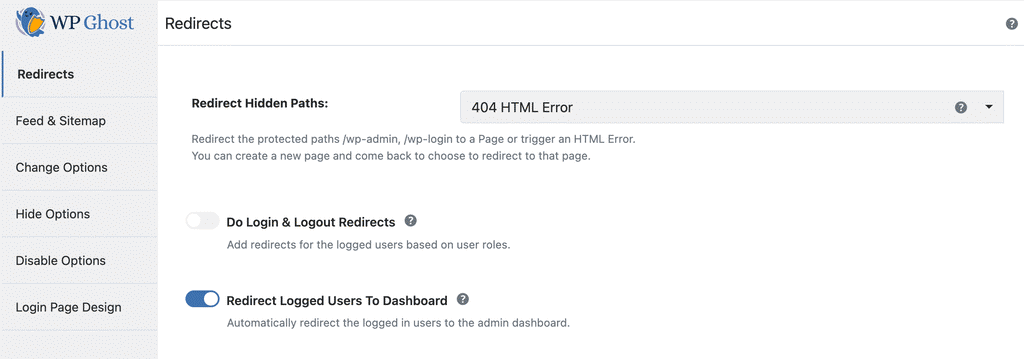
That is it. Any logged-in user who visits your custom login URL will now be automatically redirected to the WordPress admin dashboard.
Method 2 – Use a Hook in wp-config.php
If you prefer a code-based approach or need more control over the redirect behavior, you can use the hmwp_login_init hook. This method works independently of the WP Ghost settings toggle.
1. Open your wp-config.php file using sFTP or your hosting File Manager.
2. Add the following code before the “That’s all, stop editing!” comment:
add_action('hmwp_login_init', function(){
   global $current_user;
   if (isset($current_user->ID)){
      wp_redirect(admin_url());
      exit;
    }
});
3. Save the file and upload it back to your server.
This code checks whether the visitor is already logged in when they access the login page. If they are, it redirects them to the admin dashboard immediately. If they are not logged in, the login form loads normally.
You can also add this code to your theme’s functions.php file, but wp-config.php is the recommended location because it persists through theme changes.
Customizing the Redirect Destination
The built-in WP Ghost option redirects all logged-in users to the admin dashboard. If you need different redirect destinations based on user role (for example, send subscribers to the homepage and editors to the dashboard), you can modify the hook code:
add_action('hmwp_login_init', function(){
   global $current_user;
   if (isset($current_user->ID)){
      if (in_array('subscriber', $current_user->roles)){
         wp_redirect(home_url());
      } else {
         wp_redirect(admin_url());
      }
      exit;
    }
});
WP Ghost also includes built-in role-based redirect options in WP Ghost > Change Paths > Login Security where you can set custom redirect URLs for login, logout, and registration based on user roles, all without writing code.
Frequently Asked Questions
Does this work with WooCommerce customer accounts?
Yes. If a logged-in WooCommerce customer visits the login page, they will be redirected to the admin dashboard (or whatever destination you configure). If you want WooCommerce customers redirected to their My Account page instead of the dashboard, use the role-based code method above and redirect the “customer” role to the My Account URL.
Will this affect users who are not logged in?
No. Users who are not logged in will see the login form as normal. The redirect only applies to users who already have an active session.
I use both the toggle and the hook code. Will they conflict?
They will not conflict, but there is no reason to use both. The built-in WP Ghost toggle does the same thing as the hook code. Pick one method. The toggle is simpler and recommended for most users.
Does this require a custom login path to work?
The feature is designed for sites using a custom login path through WP Ghost. If you are using the default /wp-login.php, WordPress already handles this redirect natively. The feature becomes useful when you have changed the login path with WP Ghost and want the same redirect behavior on the new URL.
Does WP Ghost modify WordPress core files?
No. WP Ghost uses server rewrite rules and WordPress hooks. No core files are moved, renamed, or modified. Deactivating the plugin restores all default paths instantly.