How to Change the WordPress Database Prefix for Better Security
October 1, 2021
This tutorial has moved to the new WP Ghost Knowledge Base where each feature is presented in detail.
Change the default wp_ database prefix to a random one with a single click in WP Ghost’s Security Check. This prevents SQL injection attacks that target hardcoded WordPress table names like wp_users and wp_options.
Why Changing the Database Prefix Matters
Almost everything in WordPress is stored in the database: your posts, pages, comments, user accounts, plugin settings, and WooCommerce orders. The database is the most valuable target on your site.
Every WordPress installation uses the same default table prefix: wp_. This means every WordPress database has tables named wp_posts, wp_users, wp_options, wp_usermeta, and so on. SQL injection attacks exploit this predictability. A bot that finds an injection vulnerability in a plugin can run queries like SELECT * FROM wp_users to extract credentials, because it already knows the exact table names.
Changing the prefix to something random, like abc123_, means those hardcoded queries fail. The bot sends SELECT * FROM wp_users, but the actual table is abc123_users. The query returns nothing. Combined with WP Ghost’s 8G Firewall (which blocks SQL injection patterns at the server edge) and path security (which makes vulnerable plugin paths invisible), this creates a strong multi-layer defense against database attacks.
Default Prefix vs. Custom Prefix
| Table Name | Default Prefix (Vulnerable) | Custom Prefix (Secured) |
|---|---|---|
| Posts | wp_posts | abc123_posts |
| Users | wp_users | abc123_users |
| Options | wp_options | abc123_options |
| User meta | wp_usermeta | abc123_usermeta |
| WooCommerce orders | wp_wc_orders | abc123_wc_orders |
| Hardcoded SQL injection | Works – table names match | Fails – table names do not match |
How to Change the Database Prefix with WP Ghost
WP Ghost Premium includes a one-click database prefix change directly in the Security Check tool. No manual database editing, no phpMyAdmin, no risk of making a mistake in SQL queries.
Step 1 – Back Up Your Database
This is the most important step. The database prefix change physically renames your database tables and updates wp-config.php. Always create a full database backup before proceeding. You can use your hosting panel’s backup tool, a plugin like UpdraftPlus, or export the database through phpMyAdmin.
Step 2 – Run the Security Check
1. Go to WP Ghost > Security Check.
2. Click Start Scan.
3. WP Ghost runs 39 security tasks. If your database uses the default wp_ prefix, it will be flagged as a security issue.
Step 3 – Fix the Database Prefix
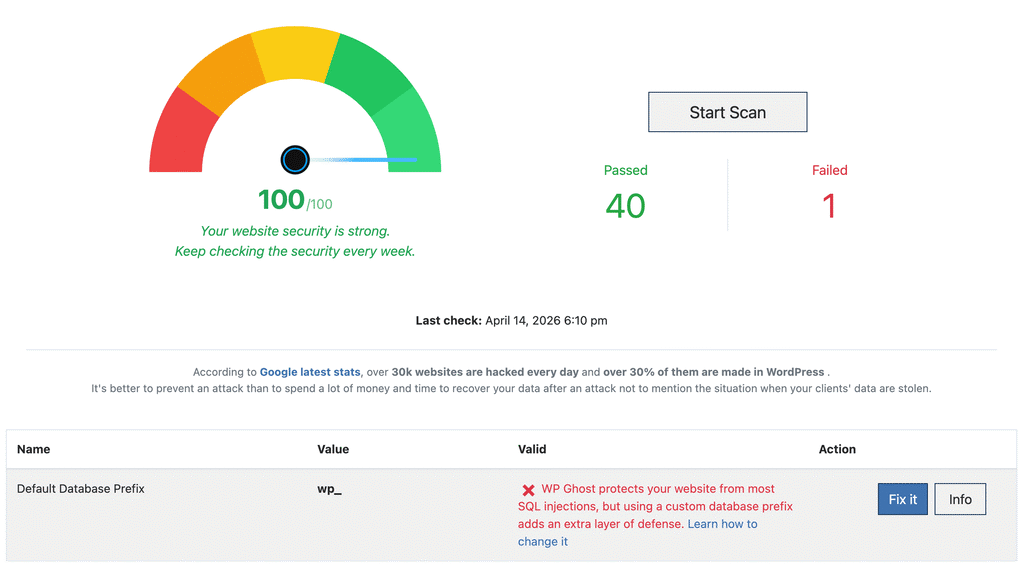
4. Find the Database Prefix task in the Security Check results.
5. Click the Fix it button.
6. WP Ghost automatically renames all database tables with a random prefix and updates the $table_prefix value in wp-config.php.
That is it. Your database tables now use a custom prefix that SQL injection scripts can not guess.
This feature is Multisite compatible. WP Ghost automatically detects WordPress Multisite installations and renames all network tables including per-site tables (like wp_2_posts, wp_3_options).
Undo the Database Prefix Change
If you experience any issues after changing the prefix, WP Ghost includes an undo option. After the prefix change, the same Security Check task shows an undo button that renames all tables back to wp_ and restores the original $table_prefix value in wp-config.php.
Troubleshooting
Site shows a database connection error after changing the prefix. The $table_prefix value in wp-config.php may not match the actual table names. If you can access the dashboard, use the undo button in Security Check. If you can not access the site, open wp-config.php via sFTP and change $table_prefix back to 'wp_'. Then check your database tables using phpMyAdmin to see what prefix they currently have, and make wp-config.php match.
Some plugins stopped working after the prefix change. A few plugins store the table prefix in their own configuration or create custom tables with hardcoded prefixes. Deactivate and reactivate the affected plugin so it picks up the new prefix. If the issue persists, check if the plugin created custom tables that were not renamed and contact the plugin author.
Security Check does not show the prefix task. Your database prefix is already changed from the default wp_. The task only appears when the prefix is still the WordPress default. No action needed.
What Else You Should Fix in Security Check
While you are in the Security Check, WP Ghost can also fix other database and server-level security issues with one click. The Security Check tool runs 39 tasks covering path security, file permissions, weak usernames, SALT key regeneration, WordPress debugging mode, plugin/theme editor status, and more. Each task includes a Fix it button for Premium users.
Other related hardening steps you should consider: fix file and folder permissions, set .htaccess to read-only, and restrict database user permissions using phpMyAdmin.
Frequently Asked Questions
Is it safe to change the database prefix on a live site?
Yes, but always back up your database first. WP Ghost handles the renaming process reliably, including updating wp-config.php and all internal references. The undo option provides a rollback path if anything goes wrong. For extra safety, test on a staging site first if one is available.
Does this actually rename the tables in the database?
Yes. Unlike WP Ghost’s path changes (which use rewrite rules and do not modify files), the database prefix change physically renames your database tables and updates the $table_prefix value in wp-config.php. This is a real database modification, which is why backing up first is important.
Is this a free or Premium feature?
Changing the database prefix through WP Ghost’s Security Check is a Premium feature. The free version identifies the issue during the scan but the one-click Fix it button requires WP Ghost Premium. You can also change the prefix manually using phpMyAdmin if you prefer, but the manual method requires running SQL queries and editing wp-config.php by hand.
Does this work with WooCommerce?
Yes. WooCommerce tables (like wp_wc_orders, wp_woocommerce_sessions) are renamed along with all other WordPress tables. WooCommerce reads the prefix from wp-config.php and adapts automatically. Cart, checkout, and order management continue working normally.
Is changing the database prefix enough to prevent SQL injection?
Changing the prefix is one layer of protection. It breaks hardcoded queries in automated attack scripts. For complete SQL injection prevention, combine it with WP Ghost’s 8G Firewall (which blocks injection patterns at the server edge), path security (which makes plugin paths invisible to bots), and keeping all plugins updated.
Does WP Ghost modify WordPress core files?
For this specific feature, WP Ghost modifies wp-config.php (to update the $table_prefix value) and renames database tables. This is different from WP Ghost’s path security features, which never modify any files. The database prefix change is a permanent modification with an undo option.