WordPress SQL Injection Prevention: Stop Attacks Before They Reach Your Database

Malicious database code stopped by a shield before it reaches a WordPress database

Check your server logs right now. If you run WordPress, you are almost certainly seeing requests with UNION SELECT, ' OR 1=1--, or ?orderby= payloads buried in them. Site owners are reporting waves of automated bots hammering hundreds of sites at once, all probing the same injectable parameters. You did not invite this traffic, and most of it never stops, it just moves to the next vulnerable endpoint until it finds one.

SQL injection (SQLi) is the attack behind those probes. It lets an attacker slip database commands into a form field, URL parameter, or API request that your site runs as if you typed them yourself. A successful hit can dump your wp_users table, read every customer record, or quietly create a hidden admin account you will not notice until your traffic is redirected to a spam network. This guide shows you how to shut that door, first in your code, then at the edge before requests ever reach PHP.

Understand What SQL Injection Actually Does to Your Site

Your WordPress database answers questions in SQL. A normal request asks “show me post 42.” A SQL injection request smuggles extra instructions into that question, “show me post 42, and also every row in the users table.” When your code builds a query by gluing raw user input directly into the SQL string, the database cannot tell your intent from the attacker’s.

That is why the vast majority of real-world WordPress SQLi never touches core WordPress at all. It comes through plugins and themes that query the database with unsanitized input. Recent disclosures show the pattern repeating: unauthenticated SQL injection through an orderby parameter, credential disclosure through a translation plugin’s database query, injectable donation and custom-post-type plugins. WordPress core is hardened; the weak link is almost always third-party code you installed and forgot about.

The fix works on two levels. Level one is writing and running code that never trusts input. Level two is a firewall that recognizes attack patterns and blocks them before a vulnerable plugin ever gets the chance to run them. You want both.

Use Prepared Statements for Every Database Query

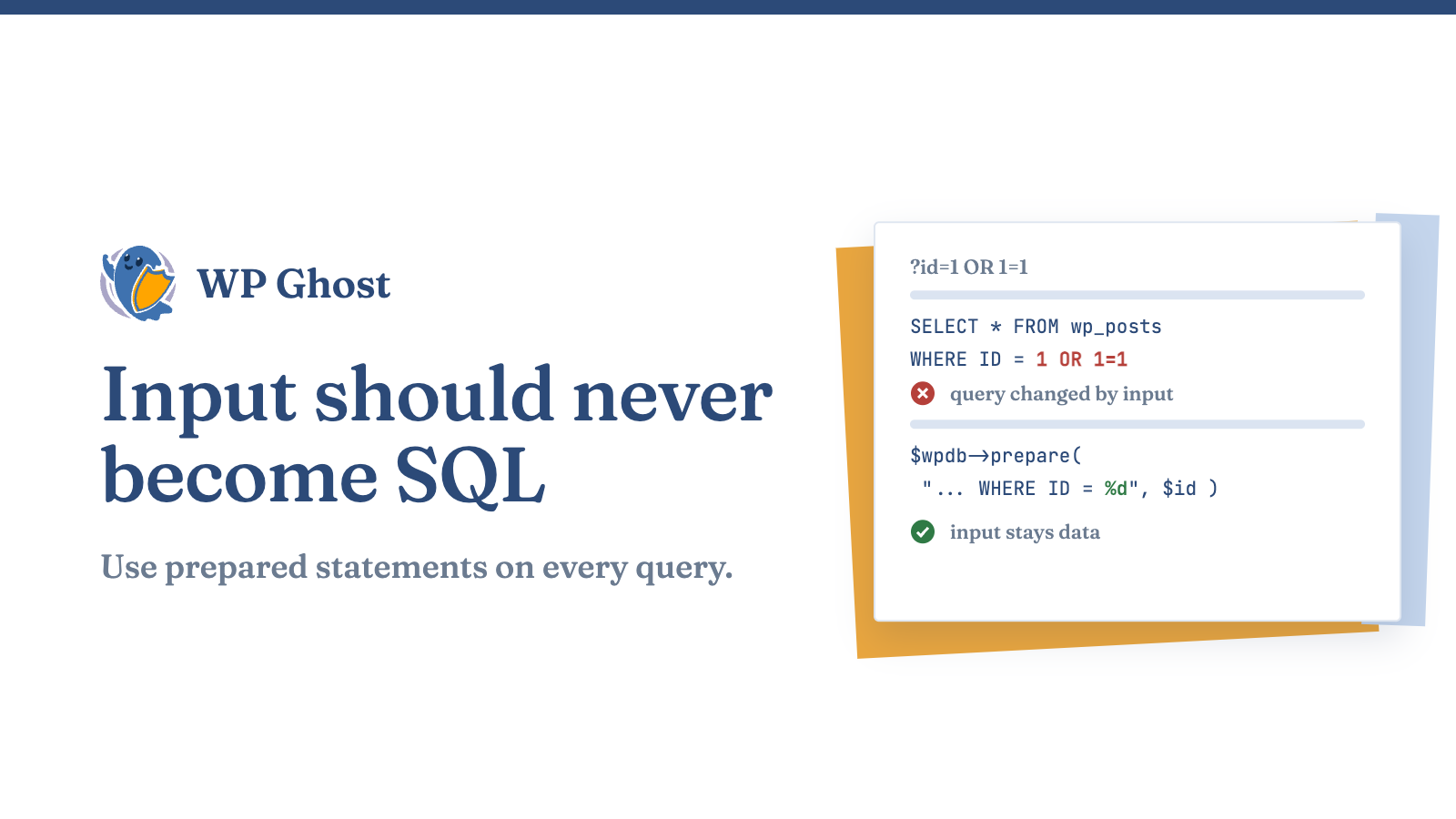
If you write or maintain any custom code, a theme functions.php snippet, a small plugin, an AJAX handler, this is the single most important habit. Never concatenate user input into a query. Use WordPress’s $wpdb->prepare() method, which separates the query structure from the values so the database treats input as data, never as commands.

Vulnerable, never do this:

php

$id = $_GET['id'];
$results = $wpdb->get_results( "SELECT * FROM {$wpdb->posts} WHERE ID = $id" );

Safe, do this instead:

php

$id = $_GET['id'];
$results = $wpdb->get_results(
    $wpdb->prepare( "SELECT * FROM {$wpdb->posts} WHERE ID = %d", $id )
);

The %d placeholder forces $id to be treated as an integer. Use %s for strings and %f for floats. Even if an attacker sends 1 OR 1=1, prepare() neutralizes it. This one change closes the door on most injection vectors in custom code.

A blunt but honest warning that keeps coming up from developers: pasting AI-generated snippets into functions.php without understanding sanitization is an open invitation for SQL injection. If you cannot explain why a query is safe, do not ship it.

Validate and Sanitize Every Input Before It Reaches the Database

Prepared statements protect the query. Sanitization protects everything upstream of it. Validate that input is the shape you expect, then sanitize it to strip anything dangerous.

  1. Validate type and range first. If a field should be a post ID, cast it with absint(). If it should be an email, check it with is_email(). Reject anything that fails instead of trying to clean it.
  2. Sanitize with the right function for the data. Use sanitize_text_field() for plain text, sanitize_email() for addresses, sanitize_key() for slugs and keys, and esc_url_raw() for URLs you plan to store.
  3. Never trust $_GET, $_POST, $_REQUEST, or REST API input. Every one of those is attacker-controllable. Treat all of them as hostile until you have validated and sanitized them.

Validation and sanitization do not replace prepared statements, they layer in front of them. Defense in depth means an attacker has to beat several independent controls, not just one.

Keep Core, Plugins, and Themes Updated on a Schedule

Most WordPress SQL injection incidents exploit a known vulnerability that already had a patch available. The attacker is not clever; they are just faster than your update schedule. Botnets scan for outdated plugin versions and fire the matching exploit automatically, often within days of a disclosure going public.

Turn on automatic updates for minor core releases at minimum, and review plugin and theme updates weekly. Before you update a plugin, glance at whether its recent changelog mentions security or escaping fixes, that is your signal the previous version was exploitable. And delete plugins you no longer use. An inactive plugin still sits on disk and can still be reachable by a direct request, so dead code is live risk.

Audit Plugins for Injection History Before You Install

Every plugin you add widens your attack surface. Before installing, check the plugin’s vulnerability history in a public patch database and confirm it has been updated recently. A plugin that has not shipped an update in a year is a plugin nobody is watching. Prefer well-maintained tools with a track record of fast security patches over an abandoned plugin that happens to have the feature you want.

Block Injection Attempts at the Firewall, Before They Reach PHP

Here is the uncomfortable reality: you do not control the code inside every plugin on your site, and you cannot personally audit each update. A brand-new zero-day in a plugin you already trust can be exploited before a patch exists. That gap is exactly what a Web Application Firewall (WAF) is for.

A firewall inspects incoming requests and blocks ones that carry SQL injection signatures, the UNION SELECT statements, stacked queries, and comment-sequence tricks attackers use, before WordPress ever loads the vulnerable code. It is your safety net for the window between a vulnerability being discovered and you being able to patch it.

The Hide My WP Ghost security firewall is built to sit in front of WordPress and filter these malicious requests. Its firewall rules are designed to detect and drop common SQL injection payloads at the edge, so a probing bot gets a block page instead of a database response. Paired with its ability to change and hide the default WordPress paths attackers script against, it removes the obvious targets those automated scans depend on. A firewall is not a license to skip prepared statements, it is the layer that covers the code you cannot see or fix yourself.

If you already run a firewall as part of your current security solution, confirm its SQL injection rules are enabled and set to block rather than log-only. Detection you never act on is not protection.

Lock Down the Database Itself

Reduce what an attacker can do even if a query slips through.

  • Give the WordPress database user only the privileges it needs. For most sites that is SELECT, INSERT, UPDATE, and DELETE, not DROP, GRANT, or FILE. A user that cannot drop tables cannot be forced to drop tables.
  • Change the default wp_ table prefix on new installs. It will not stop a determined attacker, but it breaks the many automated exploits that hard-code wp_users and wp_options into their payloads.
  • Keep database backups off the web root and test that you can actually restore them. Your fastest recovery from any successful injection is a clean, recent backup.

Frequently Asked Questions

Can a security plugin alone protect me from SQL injection?

A firewall dramatically reduces your exposure by blocking known attack patterns at the edge, and it is the best available protection for vulnerabilities you cannot patch yourself. But it works best combined with clean code, prepared statements and sanitization, and prompt updates. Treat the firewall as your outer wall, not your only wall.

I do not write code. Does SQL injection still affect me?

Yes. You are exposed through the plugins and themes you install, not code you wrote. Your defenses are keeping everything updated, removing plugins you do not use, and running a firewall that blocks injection attempts before a vulnerable plugin can process them.

How do I know if my site has already been injected?

Watch for unexplained admin accounts, spam links or redirects that appear in your content, unfamiliar entries in wp_options, or a sudden Google “this site may be hacked” warning. Scan your database and files, and if you find a compromise, restore from a clean backup taken before the intrusion and change every credential.

Does changing my table prefix really help?

It is a minor, one-time hardening step that breaks a class of automated exploits hard-coded to wp_ table names. It is worth doing on a fresh install but is not a substitute for prepared statements or a firewall.

Are the constant bot probes in my logs something to worry about?

The probes themselves are background noise every WordPress site sees, automated scanners testing for injectable parameters. They only become an incident if one finds an unpatched vulnerability. That is precisely why layered defense and a blocking firewall matter: they turn a lucky probe into a dead end.