WP Ghost with Really Simple SSL – htaccess Rule Order and Compatibility
November 14, 2020
This tutorial has moved to the new WP Ghost Knowledge Base where each feature is presented in detail.
WP Ghost (formerly Hide My WP Ghost) is fully compatible with Really Simple SSL. Both plugins write to .htaccess, so the rule order matters. Save Really Simple SSL settings first, then re-save WP Ghost settings to ensure the correct order. This is a one-time step.
How They Work Together
Really Simple SSL handles the HTTP to HTTPS redirect and mixed content fixes. WP Ghost handles path security, firewall rules, and security headers (including HSTS). They address different security layers with no feature overlap. The only interaction point is the .htaccess file, where both plugins write rewrite rules.
The .htaccess Rule Order
When Really Simple SSL enables the 301 redirect via .htaccess, it adds SSL redirect rules to .htaccess. These rules need to appear before WP Ghost’s path rewrite rules for both plugins to work correctly. If Really Simple SSL’s rules end up after WP Ghost’s rules, the redirect may not fire properly.
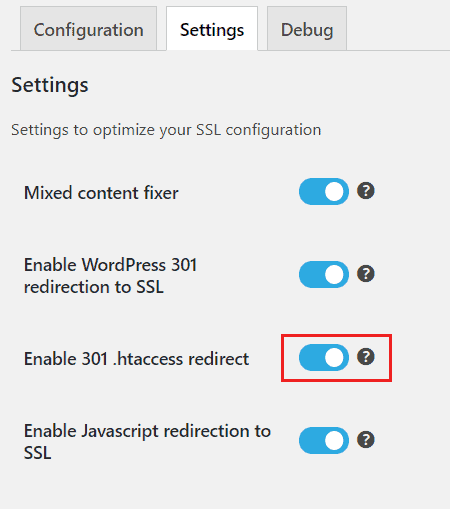
The Really Simple SSL rules look like this in your .htaccess file:
# BEGIN rlrssslReallySimpleSSL
RewriteEngine on
RewriteCond %{HTTPS} !=on [NC]
RewriteRule ^(.*)$ https://%{HTTP_HOST}/$1 [R=301,L]
# END rlrssslReallySimpleSSL
How to Ensure Correct Rule Order
Save settings in Really Simple SSL first. Then go to WP Ghost > Change Paths and click Save. WP Ghost repositions its rules correctly in .htaccess. This is a one-time step unless you change Really Simple SSL’s .htaccess redirect settings later.
If the .htaccess file is not writable by either plugin, open .htaccess via FTP or File Manager and manually place the Really Simple SSL block at the top of the file, before the WP Ghost rules (which start with # BEGIN HMWP_RULES).
Troubleshooting
Mixed content warnings after enabling SSL. This is a Really Simple SSL issue, not a WP Ghost conflict. Really Simple SSL’s “Mixed Content Fixer” handles most cases. Check your browser console for specific resources still loading over HTTP and update them manually if needed.
WP Ghost paths stopped working after saving Really Simple SSL. Really Simple SSL repositioned the .htaccess rules. Re-save WP Ghost settings to restore the correct order.
Redirect loop after enabling both plugins. Check that only one plugin is handling the HTTP to HTTPS redirect. If your hosting also redirects to HTTPS at the server level, disable Really Simple SSL’s .htaccess redirect to avoid a double redirect.
Frequently Asked Questions
Does WP Ghost have its own SSL redirect?
No. WP Ghost does not include a dedicated SSL redirect. It relies on Really Simple SSL, your hosting, or Cloudflare for the HTTP to HTTPS redirect. WP Ghost’s security headers feature adds HSTS (Strict-Transport-Security), which tells browsers to always use HTTPS after the first visit – but this is different from the 301 redirect that Really Simple SSL provides.
Do I need to re-save WP Ghost every time I save Really Simple SSL?
Only if Really Simple SSL modifies the .htaccess file. For most users, this is a one-time setup – save Really Simple SSL, then save WP Ghost, and the order is correct from that point forward.
What if I do not use Really Simple SSL’s .htaccess redirect?
If you use Really Simple SSL’s PHP-based redirect or if your hosting handles SSL at the server level, there is no .htaccess rule order issue. WP Ghost and Really Simple SSL work together without any configuration in that case.
Can I use both WP Ghost’s HSTS header and Really Simple SSL?
Yes. HSTS and the 301 redirect serve different purposes. The 301 redirect handles the initial HTTP to HTTPS switch. HSTS tells the browser to never even attempt an HTTP connection on future visits. Using both provides the strongest HTTPS enforcement.
Does WP Ghost modify WordPress core files?
No. Both plugins use standard WordPress mechanisms. WP Ghost writes rewrite rules to .htaccess and uses WordPress hooks. No core files are modified.
Related Tutorials
Move WordPress from HTTP to HTTPS – complete HTTPS migration guide with WP Ghost HSTS.
Header Security – enable HSTS and other security headers in WP Ghost.
Compatibility Plugins List – all tested plugins and hosting providers.
Customize All WordPress Paths – configure paths after SSL setup.
Emergency Disable Guide – recovery if rewrite rules cause issues.